安装和初始化
在使用 AppMetrica Push SDK 3.4.0 之前,需要 启用并初始化 AppMetrica SDK 版本 5.9.0 或更高。
步骤 1. 启用库
该库可以与以下依赖管理器兼容:
要连接 Push SDK 库,请在项目的 Podfile 中添加以下依赖:
pod 'AppMetricaPush', '~> 3.4.0' # Main module for working with Push SDK, it's required for connecting
pod 'AppMetricaPushLazy', '~> 3.4.0' # Additional module for lazy push notifications
通过 Xcode 界面进行集成
要连接库,请执行以下步骤:
-
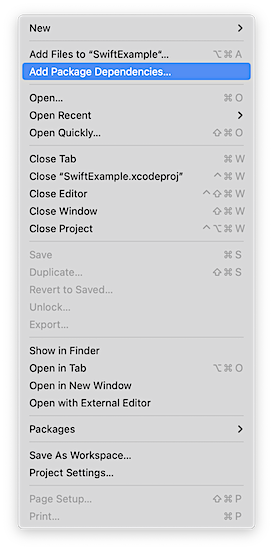
在 Xcode 项目导航器 (项目导航器) 窗口中,选择您的项目(如果使用 工作区)。 在顶部菜单中,点击文件,然后选择添加包依赖...。
-
指定仓库 URL
https://github.com/appmetrica/push-sdk-ios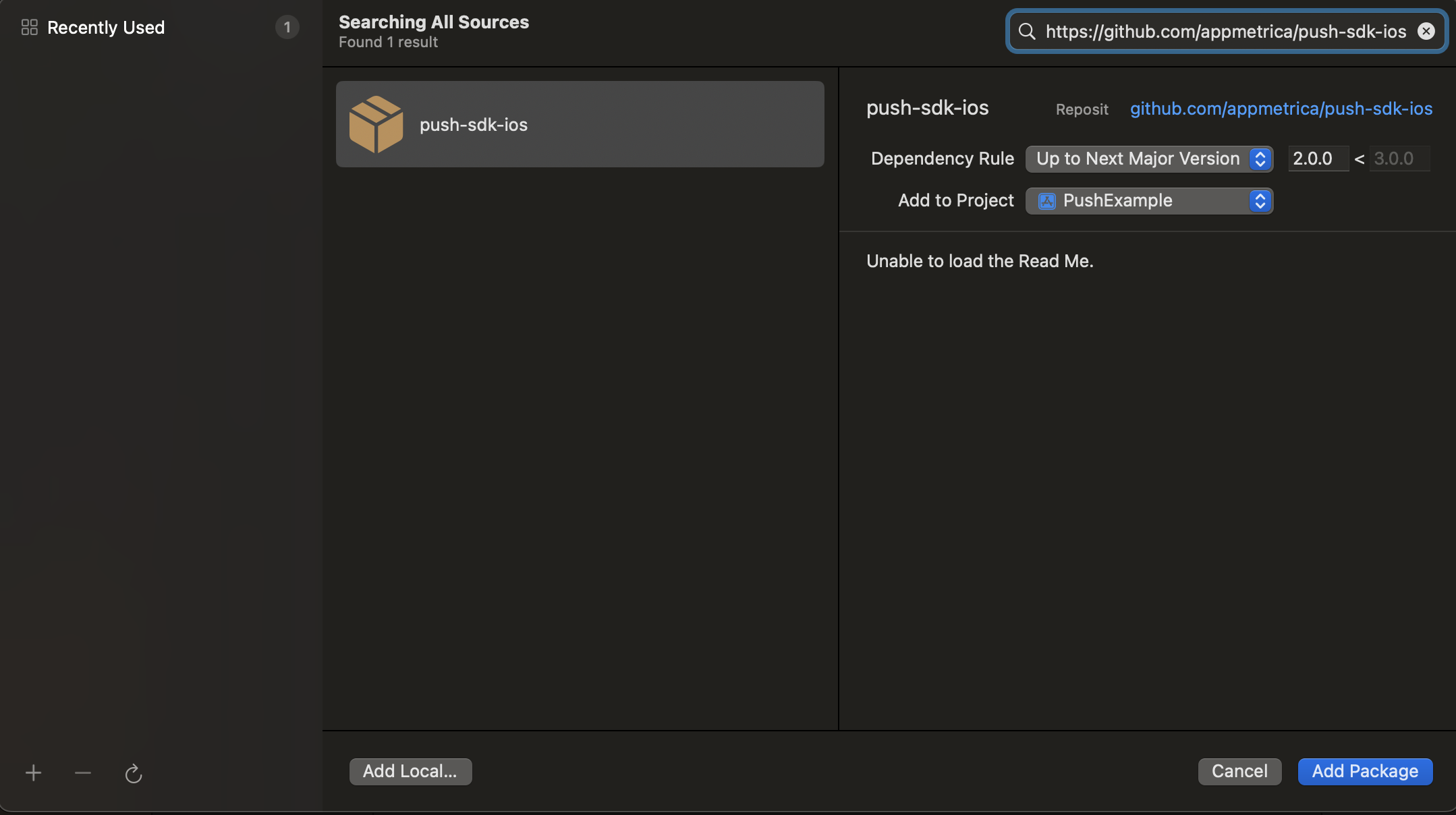
-
只保留需要的模块(要禁用模块,请在“添加到目标”中选择
无):``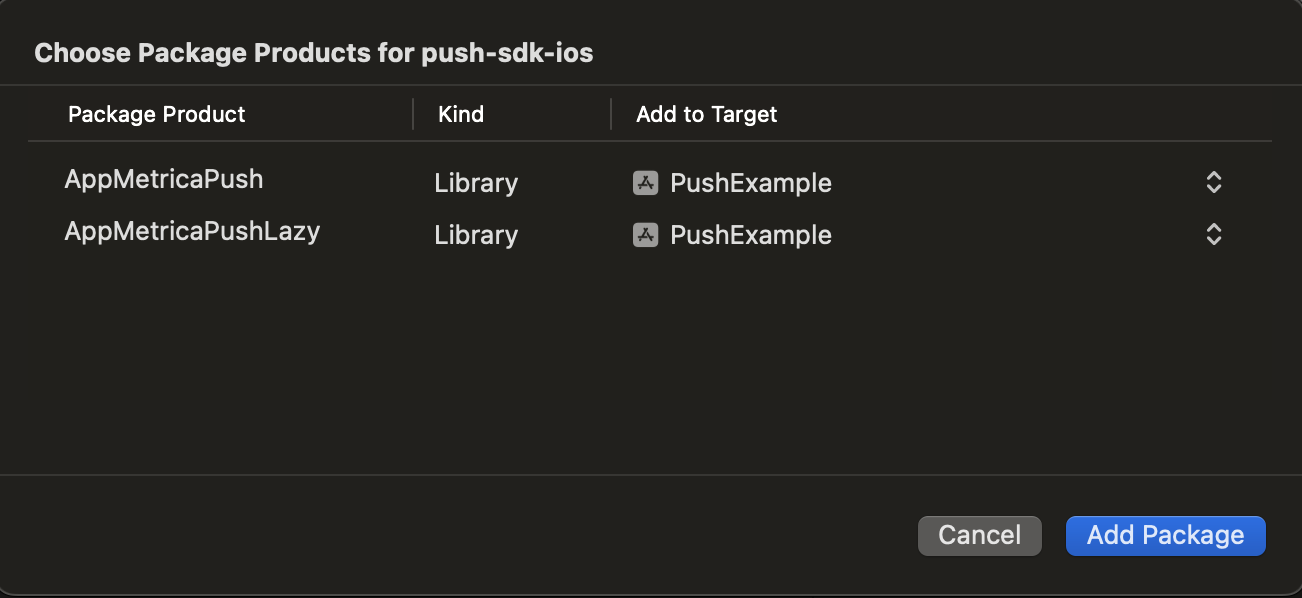
AppMetricaPush:主要的必需推送 SDK 模块。 你需要启用它才能使用 AppMetrica。AppMetricaPushLazy:额外模块,用于延迟推送通知。
通过 Package.swift 清单进行集成
首先,将以下依赖项添加到你的包的 dependencies: 数组中:
dependencies: [
   .package(
      url: "https://github.com/appmetrica/push-sdk-ios",
      from: "3.4.0"
   )
],
根据项目需求可以启用的AppMetrica Push SDK 模块:
AppMetricaPush:主要的必需的Push SDK模块。 你需要启用它才能使用 AppMetrica。AppMetricaPushLazy:额外模块,用于延迟推送通知。
示例:在目标的 dependencies 数组中连接模块
.target(
   name: "MyTargetName",
   dependencies: [
      .product(name: "AppMetricaPush", package: "push-sdk-ios"),
      // .product(name: "AppMetricaPushLazy", package: "push-sdk-ios"), // This module is disabled
   ]
),
步骤 2. 配置AppMetrica推送
在应用程序和扩展中设置AppMetrica,如在 App 扩展中工作中所述。
AppMetrica-6.2.0 和 AppMetricaPush-3.4 将其配置共享到 AppGroup。
将以下代码添加到 UIApplicationDelegate 方法的相应实现中:
- (BOOL)application:(UIApplication *)application didFinishLaunchingWithOptions:(NSDictionary *)launchOptions
{
    // Activating AppMetrica.
    AMAAppMetricaConfiguration *configuration = [[AMAAppMetricaConfiguration alloc] initWithAPIKey:@"YOUR-API-KEY"];
    [AMAAppMetrica activateWithConfiguration:configuration];
    ...
    [AMPAppMetricaPush setExtensionAppGroup:appGroup]; // optional, need to send stored events from AppMetricaPush-2.2 and earlier
    ...
    [AMPAppMetricaPush handleApplicationDidFinishLaunchingWithOptions:launchOptions];
    ...
}
将以下代码添加到 AppDelegate 方法的相应实现中:
func application(_ application: UIApplication, didFinishLaunchingWithOptions launchOptions: [UIApplicationLaunchOptionsKey :Any]? = nil) -> Bool
{
    // Activating AppMetrica.
    let configuration = AppMetricaConfiguration(apiKey: "YOUR-API-KEY")!
    AppMetrica.activate(with: configuration)
    ...
    AppMetricaPush.setExtensionAppGroup(appGroup) // optional, need to send stored events from AppMetricaPush-2.2 and earlier
    ...
    AppMetricaPush.handleApplicationDidFinishLaunching(options: launchOptions)
    ...
}
收集关闭推送通知的交互数据
要收集推送通知关闭交互的统计数据,请为 UNNotificationCategory 类设置以下选项:
options:UNNotificationCategoryOptionCustomDismissAction
options: UNNotificationCategory.customDismissAction
步骤 3. (可选) 在通知服务扩展中设置 AppMetrica
通过 XCode 添加通知服务扩展
- 在 Xcode 中,选择 文件 → 新建 → 目标。
- 在iOS扩展部分,从列表中选择Notification Service Extension,然后点击Next。
- 在产品名称字段中输入扩展名,然后点击完成。
在应用程序和扩展中设置AppMetrica,如在 App 扩展中工作所述。
-
在 developer.apple.com 为 Notification Service Extension 创建 Bundle ID。
-
在 developer.apple.com 中创建一个 AppGroup。
-
将AppGroup添加到配置文件中,用于应用程序和通知服务扩展。 确保 AppGroup 仅对您的应用及其扩展可用。 如果AppGroup被多个应用共享,AppMetrica可能会错误地统计安装量。
-
打开 Xcode,并将 AppGroup 和 Keychain Access Group 添加到你的应用目标。
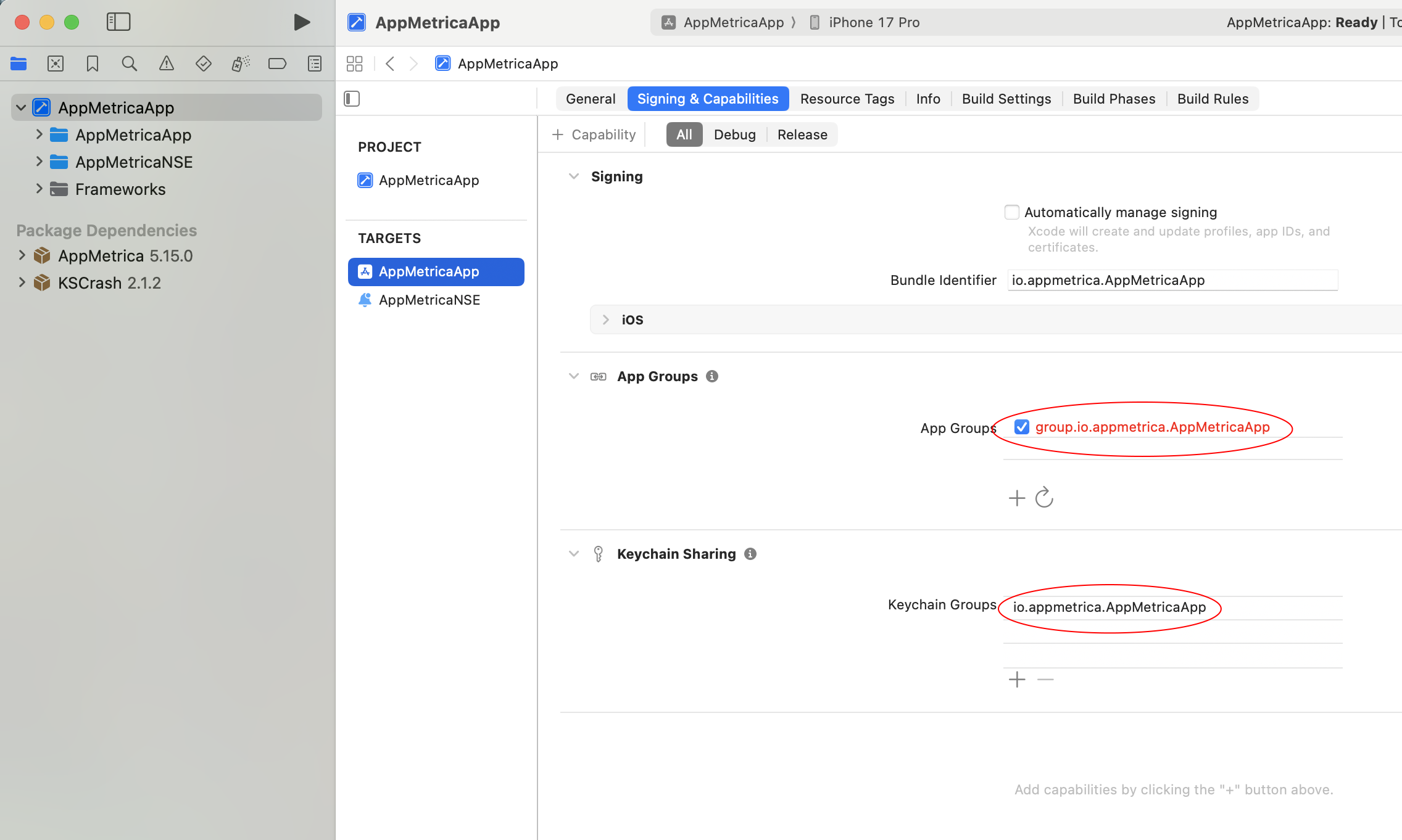
-
打开 Xcode,并将 AppGroup 和 Keychain Access Group 添加到你的 NSE 目标中。
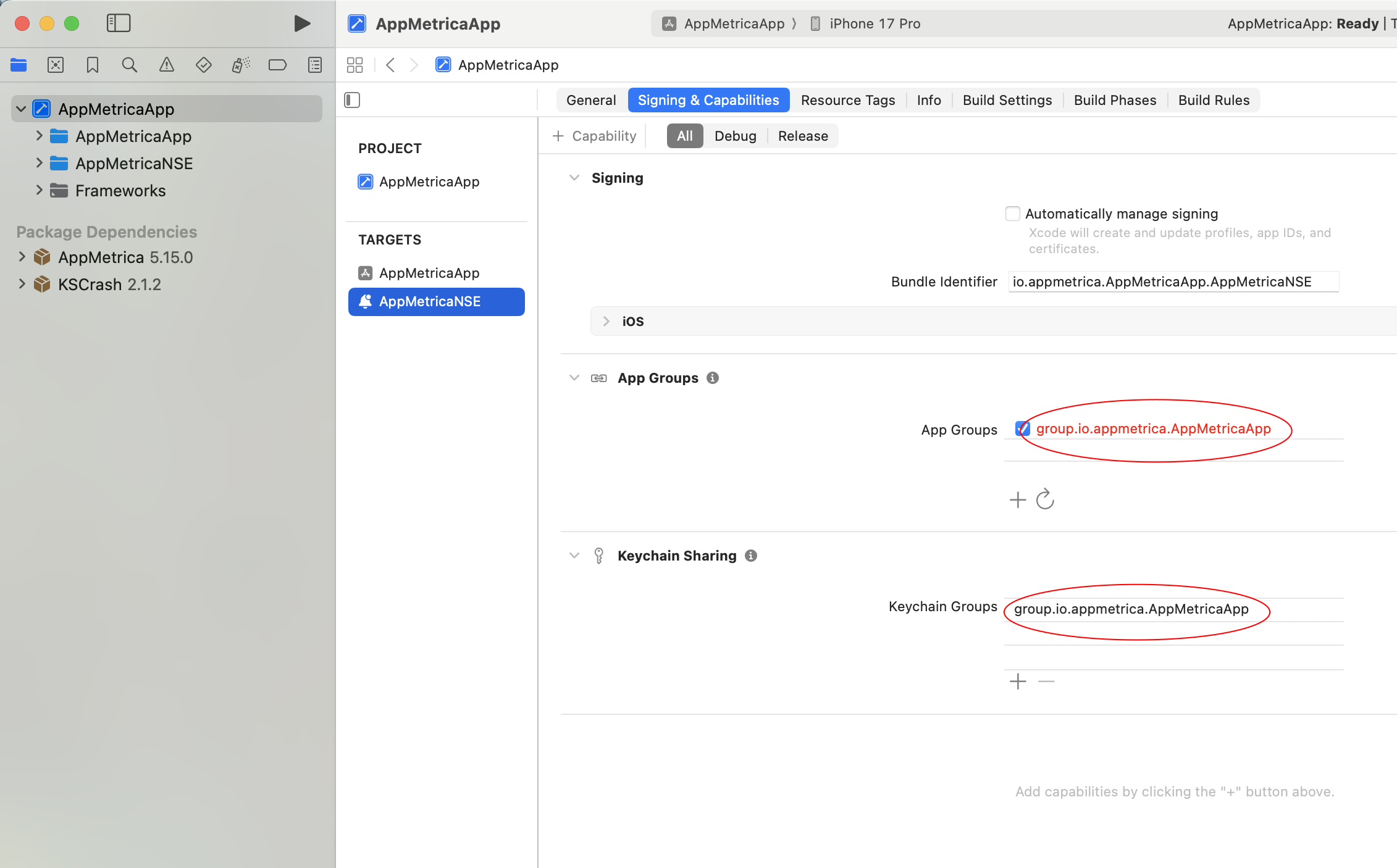
-
将AppGroup添加到
Info.plist。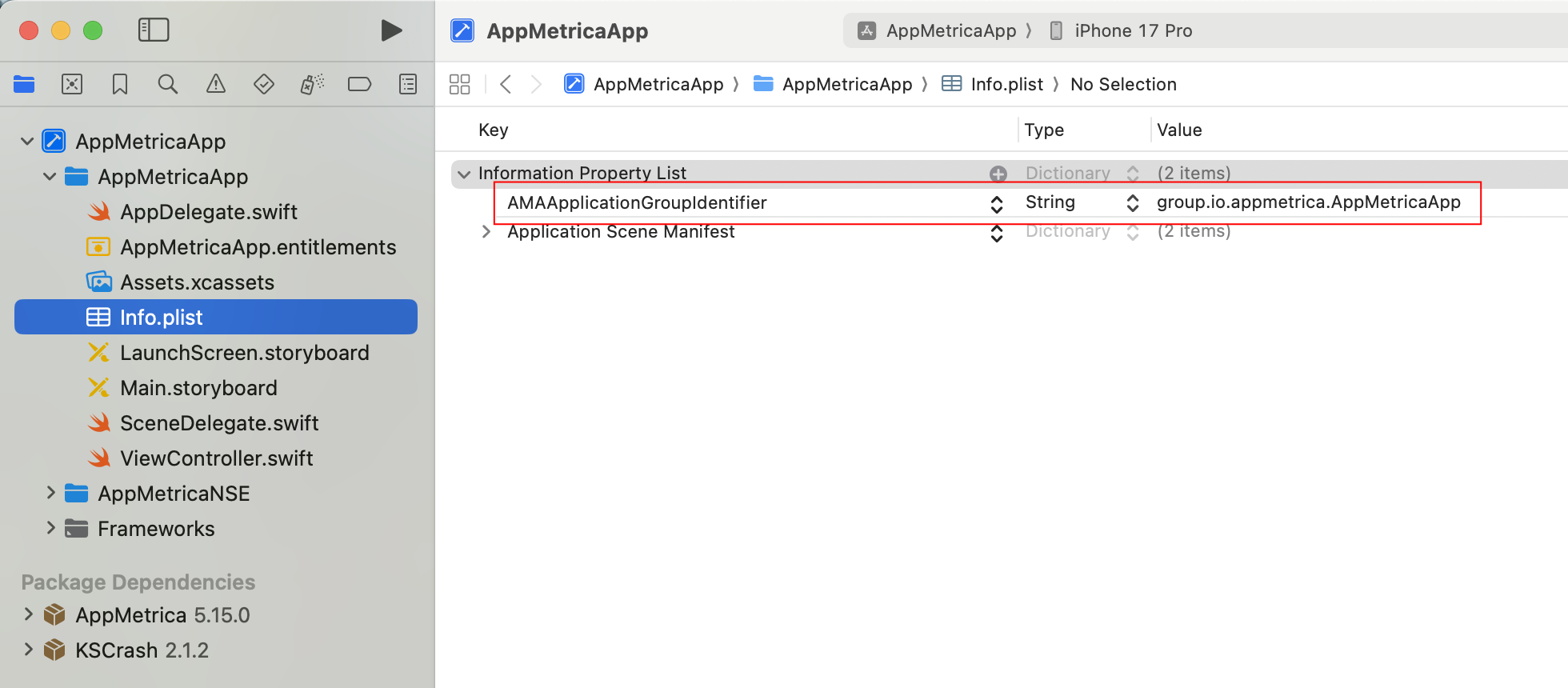
-
检查权限,确保已添加 AppGroup 和 Keychain Access Group。
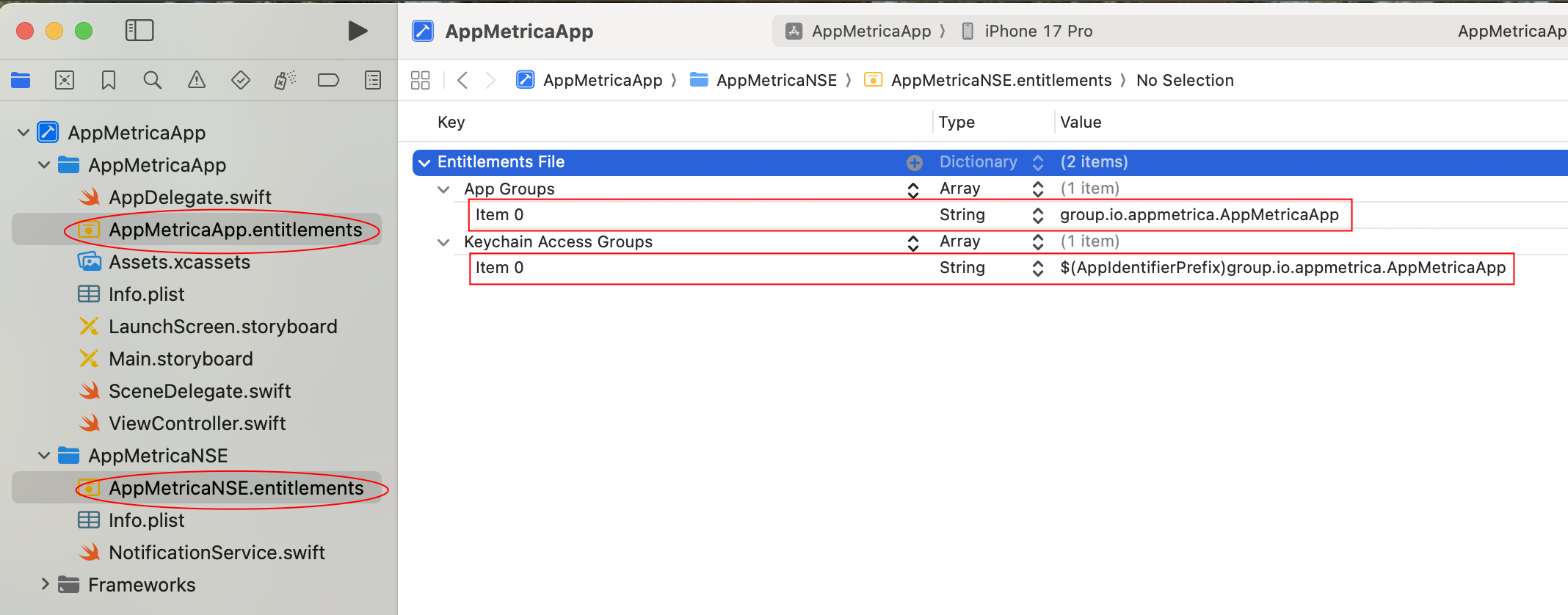
-
Implement the
通知服务.
AppMetricaPush在通知服务扩展中从您的应用程序获取配置并自动激活AppMetrica.
要使用它,请在扩展类中添加以下代码:
class NotificationService: UNNotificationServiceExtension {

    var contentHandler: ((UNNotificationContent) -> Void)?
    var bestAttemptContent: UNMutableNotificationContent?

    override func didReceive(_ request: UNNotificationRequest,
                            withContentHandler contentHandler: @escaping (UNNotificationContent) -> Void) {
       AppMetricaPush.setExtensionAppGroup(appGroup) // optional, need to send stored events from AppMetricaPush-2.2 and earlier

       AppMetricaPush.handleDidReceive(request)

       self.contentHandler = contentHandler
       bestAttemptContent = (request.content.mutableCopy() as? UNMutableNotificationContent)

       // custom logic

       AppMetrica.sendEventsBuffer()
    }

    override func serviceExtensionTimeWillExpire() {
       bestAttemptContent?()
    }
}
@interface NotificationService: UNNotificationServiceExtension

@property (nonatomic, strong) void (^contentHandler)(UNNotificationContent *contentToDeliver);
@property (nonatomic, strong) UNMutableNotificationContent *bestAttemptContent;

@end
@implementation NotificationService

+ (void)initialize {
    if ([self class] == [NotificationService class]) {
        [AMPAppMetricaPush setExtensionAppGroup:appGroup]; // push saved events
    }
}

- (void)didReceiveNotificationRequest:(UNNotificationRequest *)request
                  withContentHandler:(void (^)(UNNotificationContent * _Nonnull))contentHandler {

    [AMPAppMetricaPush handleDidReceiveNotificationRequest:request];

    self.contentHandler = contentHandler;
    self.bestAttemptContent = [request.content mutableCopy];

    // custom logic

    [AMAAppMetrica sendEventsBuffer]; // force send all events
}

- (void)serviceExtensionTimeWillExpire {
  if (self.bestAttemptContent != nil) {
    self.bestAttemptContent();
  }

}

@end
在扩展程序中可以使用AppMetrica的自定义配置。 示例如下:
class NotificationService: UNNotificationServiceExtension {

    var contentHandler: ((UNNotificationContent) -> Void)?
    var bestAttemptContent: UNMutableNotificationContent?

    func activateIfNeeded() {
       // system does not always spawn new process to handle few notification, but AppMetrica ignores second initialization
       let configuration = AppMetricaConfiguration(apiKey: "API-KEY")!
       AppMetrica.activate(with: configuration)

       AppMetricaPush.setExtensionAppGroup(appGroup) // optional, need to send stored events from AppMetricaPush-2.2 and earlier
    }

    override func didReceive(_ request: UNNotificationRequest,
                            withContentHandler contentHandler: @escaping (UNNotificationContent) -> Void) {
       activateIfNeeded()

       AMPAppMetricaPush.handleDidReceive(request)

       self.contentHandler = contentHandler
       bestAttemptContent = (request.content.mutableCopy() as? UNMutableNotificationContent)

       // custom logic

       AppMetrica.sendEventsBuffer()
    }

    override func serviceExtensionTimeWillExpire() {
       bestAttemptContent?()
    }
}
@implementation NotificationService

+ (void)initialize {
    if ([self class] == [NotificationService class]) {
       AMAAppMetricaConfiguration *configuration =
          [[AMAAppMetricaConfiguration alloc] initWithAPIKey:@"API-KEY"];
       [AMAAppMetrica activateWithConfiguration:configuration];

       [AMPAppMetricaPush setExtensionAppGroup:appGroup]; // push saved events
    }
}

- (void)didReceiveNotificationRequest:(UNNotificationRequest *)request
                   withContentHandler:(void (^)(UNNotificationContent * _Nonnull))contentHandler {

    [AMPAppMetricaPush handleDidReceiveNotificationRequest:request];

    self.contentHandler = contentHandler;
    self.bestAttemptContent = [request.content mutableCopy];

    // custom logic

    [AMAAppMetrica sendEventsBuffer]; // force send all events
}

- (void)serviceExtensionTimeWillExpire {
    if (self.bestAttemptContent != nil) {
      self.bestAttemptContent();
    }
}

@end
第4步。 在 Apple Push Notification Service (APNs) 中注册您的应用
注册会将应用准备好以接收推送通知。 要向 iOS 设备发送通知,请对应用代码做如下修改:
let center = UNUserNotificationCenter.current()
center.requestAuthorization(options:\[.badge, .alert, .sound\]) { (granted, error) in
  // Enable or disable features based on authorization.
}
application.registerForRemoteNotifications()
这些数据通常通过以下方法传递:
func application(_ application: UIApplication, didFinishLaunchingWithOptions
                 launchOptions: [UIApplicationLaunchOptionsKey :Any]? = nil) -> Bool
要了解更多关于使用的方法,请查看文档:developer.apple.com
UNAuthorizationOptions options =
  UNAuthorizationOptionAlert |
    UNAuthorizationOptionBadge |
    UNAuthorizationOptionSound;
UNUserNotificationCenter *center = [UNUserNotificationCenter currentNotificationCenter];
[center requestAuthorizationWithOptions:options completionHandler:^(BOOL granted, NSError *error) {
  // Enable or disable features based on authorization.
}];
[application registerForRemoteNotifications];
这些数据通常通过以下方法传递:
- (BOOL)application:(UIApplication *)application didFinishLaunchingWithOptions:(NSDictionary *)launchOptions
要了解更多关于使用的方法,请参阅文档:developer.apple.com
第5步。 为您的应用注册设备令牌
要通过 AppMetrica 发送推送通知,需要您的应用设备令牌。 要注册它:
将以下代码添加到AppDelegate:
func application(_ application: UIApplication, didRegisterForRemoteNotificationsWithDeviceToken deviceToken: Data)
{
    // If the AppMetrica SDK library was not initialized before this step,
    // calling the method causes the app to crash.
    AppMetricaPush.setDeviceTokenFrom(deviceToken)
}
在你的 UIApplicationDelegate 实现中添加以下代码:
- (void)application:(UIApplication *)application didRegisterForRemoteNotificationsWithDeviceToken:(NSData *)deviceToken
{
    // If the AppMetrica SDK library was not initialized before this step,
    // calling the method causes the app to crash.
    [AMPAppMetricaPush setDeviceTokenFromData:deviceToken];
}
要注册设备令牌并发送 APN 环境,请添加以下代码:
func application(_ application: UIApplication, didRegisterForRemoteNotificationsWithDeviceToken deviceToken: Data)
{
    // If the AppMetrica SDK library was not initialized before this step,
    // calling the method causes the app to crash.
    #if DEBUG
        let pushEnvironment = AppMetricaPushEnvironment.development
    #else
        let pushEnvironment = AppMetricaPushEnvironment.production
    #endif
    AppMetricaPush.setDeviceTokenFrom(deviceToken, pushEnvironment: pushEnvironment)
}
- (void)application:(UIApplication *)application didRegisterForRemoteNotificationsWithDeviceToken:(NSData *)deviceToken
{
    // If the AppMetrica SDK library was not initialized before this step,
    // calling the method causes the app to crash.
    #ifdef DEBUG
        AMPAppMetricaPushEnvironment pushEnvironment = AMPAppMetricaPushEnvironmentDevelopment;
    #else
        AMPAppMetricaPushEnvironment pushEnvironment = AMPAppMetricaPushEnvironmentProduction;
    #endif
    [AMPAppMetricaPush setDeviceTokenFromData:deviceToken pushEnvironment:pushEnvironment];
}
注意
AppMetrica 允许您向 Sandbox APNs 发送推送通知。 但是,如果设备上运行了不同环境的应用版本(开发 和 生产),推送通知的处理可能会工作不正常。 为了避免此问题,您可以为_开发_环境使用一个单独的测试 API 密钥。
第 6 步。 配置处理推送通知的打开
配置处理推送通知打开的方式:
-
使用代理
UserNotificationCenterDelegate/AMPUserNotificationCenterDelegate. 它在推送通知被打开时自动处理接收。请对代码做如下修改:
Swift面向对象的 Cimport UserNotifications // In the "func application(_ application: UIApplication, didFinishLaunchingWithOptions // launchOptions: [UIApplicationLaunchOptionsKey : Any]? = nil) -> Bool" method: let delegate = AppMetricaPush.userNotificationCenterDelegate UNUserNotificationCenter.current().delegate = delegate#import <UserNotifications/UserNotifications.h> // In the "- (BOOL)application:(UIApplication *)application // didFinishLaunchingWithOptions:(NSDictionary *)launchOptions" method: [UNUserNotificationCenter currentNotificationCenter].delegate = [AppMetricaPush userNotificationCenterDelegate];要跟踪推送通知的打开情况和其他与之相关的操作,请创建自己的代理,命名为
UNUserNotificationCenterDelegate,并将其添加到nextDelegate:SwiftObjective-CAppMetricaPush.userNotificationCenterDelegate.nextDelegate = yourDelegate[AMPAppMetricaPush userNotificationCenterDelegate].nextDelegate = yourDelegate;之后,您可以使用代理的适当方法。
-
如果您也使用UISceneDelegate,请将以下代码添加到
scene(_:willConnectTo:options:)方法中:SwiftObjective-Cfunc scene(_ scene: UIScene, willConnectTo session: UISceneSession, options connectionOptions: UIScene.ConnectionOptions) { AppMetricaPush.handleSceneWillConnectToSession(with: connectionOptions) }- (void)scene:(UIScene *)scene willConnectToSession:(UISceneSession *)session options:(UISceneConnectionOptions *)connectionOptions { [AMPAppMetricaPush handleSceneWillConnectToSessionWithOptions:connectionOptions]; }
第 7 步。 (可选) 启用推送令牌更新
如果设备的推送令牌失效(例如用户卸载了应用),APNS 服务可能会返回 410 错误,提示“该设备令牌对于主题已不再有效”。 AppMetrica 可以通过发送静默推送通知来维护有效令牌的列表。 这会让你了解在推送广告活动开始前的设备数量。
要启用此功能,打开AppMetrica网页界面,进入应用设置,并选择使用静默推送通知更新令牌选项,在推送通知标签页中。
使用静默推送通知可以提高推送活动宣传对象评估和推送通知报告的准确性,同时也会影响应用推送通知的成功送达。
第 8 步。 (可选) 配置上传附件
备注
在推送广告的网页界面中,该功能不可用。
您可以配置推送通知中附件文件的上传:
- 通过在 Push SDK 中调用 downloadAttachmentsForNotificationRequest 方法来配置推送通知中附件文件的上传。 查看集成示例,请参阅文章上传附件。
- 添加附件(
attachments参数),使用 Push API 中的 发送推送消息 操作。
发送额外信息
如果需要,您可以随推送通知一起发送额外信息。 这些数据在AppMetrica网页界面中配置推送活动时指定。 要获取这些信息,请使用以下方法:
let userData = AppMetricaPush.userData(forNotification: userInfo)
NSString *userData = [AMPAppMetricaPush userDataForNotification:userInfo];
where userInfo 包含有关推送通知的信息。
定义通知的接收者
AppMetrica 允许你识别自己的
推送通知,如果应用程序集成了多个 Push SDK。
要检测 AppMetrica 是否是通知的接收者,请使用以下方法:
let isRelatedToAppMetricaSDK = AppMetricaPush.isNotificationRelated(toSDK: userInfo)
BOOL isRelatedToAppMetricaSDK = [AMPAppMetricaPush isNotificationRelatedToSDK:userInfo];
另请参见
如果您没有找到所需答案,可以通过反馈表单提交您的问题。 请尽可能详细地描述问题。 如果可能,请附上截图。