Tecnologies
In the Technologies section, reports on the technical specifications of user devices and operating system versions are compiled.
In technology reports, devices are counted, not users. That is why both active and background sessions are taken into account.
Report period
The report is formed for a specific time period. The default period is one week.
Dimensions
App and device
- App version.
- Build number.
- Operating System.
- Manufacturer.
- Model.
- Device type.
- Locale.
- Screen resolution.
- "Root" status.
- SDK Version.
- Operating System.
- Operating system version.
- Full operating system version.
- Carrier.
- Country MCC.
- Network.
- Bundle ID.
Metrics
Devices
- Devices.
Data export
You can export data from a report.
The data is exported based on the selected report settings: segmentation, dimension, and time period.
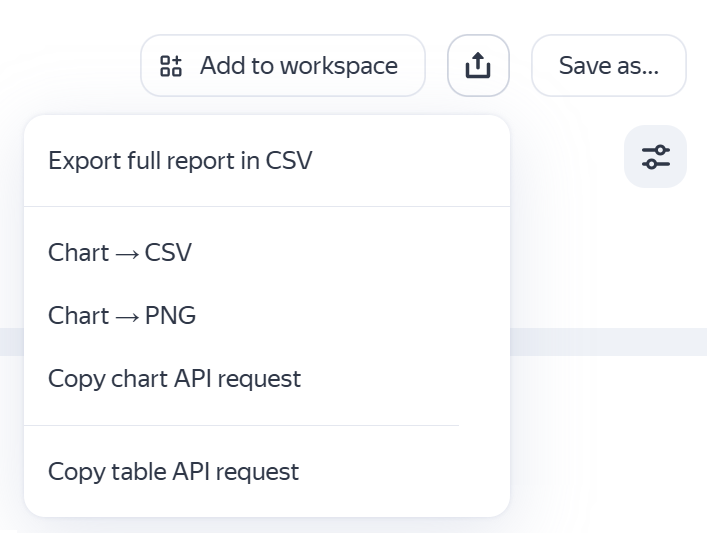
In the upper-right corner click  and select the action:
- Export full report in CSV to export data from the table in
CSVformat. - Chart → CSV to export data from the chart in
CSVformat. - Chart → PNG to export chart images in
PNGformat. - Copy chart API request — Displays the query text for exporting data from the chart using the Reporting API.
- Copy table API request — Displays the query text for exporting data from the table using the Reporting API.
You can use this query to build your own dashboard or create automated data export scripts.
If you are getting the text of the query for the first time, make sure that the browser doesn't block the pop-up authorization window. In the authorization window, allow AppMetrica to access the data.
If you didn't find the answer you were looking for, you can use the feedback form to submit your question. Please describe the problem in as much detail as possible. Attach a screenshot if possible.