---
metadata:
- name: generator
content: Diplodoc Platform v5.62.0
alternate:
- https://appmetrica.yandex.com/docs/en/new-users/data-security.md
- https://appmetrica.yandex.com/docs/ru/new-users/data-security.md
- href: https://appmetrica.yandex.com/docs/en/new-users/data-security.md
type: text/markdown
title: Markdown version
- href: https://appmetrica.yandex.com/docs/en/llms.txt
rel: describedby
---
> **Documentation Index:** Fetch the complete configuration index at https://appmetrica.yandex.com/docs/en/llms.txt
# Security and policy compliance
This section lists the legal requirements and app store guidelines related to working with AppMetrica, along with the privacy tools implemented in the service.
{% cut "GDPR compliance" %}
The General Data Protection Regulation (GDPR) regulates the collection and processing of personal information belonging to citizens of the European Economic Area. It is intended to improve data privacy and require transparency for all steps involved in collecting, storing, and processing information in the internet. The legislation is effective as of May 25, 2018.
To meet the GDPR requirements, the following is implemented in AppMetrica:
**Privacy of app users**
: All data processed by AppMetrica is non-personalized. AppMetrica reports only display technical data. They can't be used to identify the user.
**Transparency of data processing**
: The procedures for collecting, storing, and processing data are described in detail in a [Data Processing Agreement](https://yandex.ru/legal/metrica_agreement/).
**The ability to disable data collection before the user's consent is obtained.**
: To prevent the collection of any data before the user consents to it, the AppMetrica SDK lets you disable the sending statistics from the client side ([Android](https://appmetrica.yandex.com/docs/en/sdk/android/analytics/android-operations.md) | [iOS](https://appmetrica.yandex.com/docs/en/sdk/ios/analytics/ios-operations.md)).
## How to comply with the GDPR {#to-do}
To make your app meet GDPR requirements:
1. Make sure that your app's Privacy Policy clearly states that you're using AppMetrica.
1. Carefully study and accept the [Data Processing Agreement](https://yandex.ru/legal/metrica_agreement/). It describes the procedures for collecting, storing, and processing data.
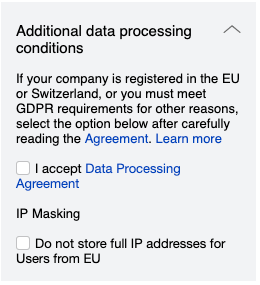{style="border: solid 1px #cccccc; max-width: 800px;"}
If you have any questions about the Agreement, contact support from the [feedback form](https://appmetrica.yandex.com/docs/en/troubleshooting/feedback-new.md).
{% endcut %}
{% cut "ISO/IEC 27001 compliance" %}
ISO/IEC-27001 is an information security standard that specifies and provides requirements for an information security management system (ISMS). It contains a list of security controls related to information risk management. It is part of the [ISO/IEC 27000](https://www.iso.org/isoiec-27001-information-security.html) family of standards that helps organizations ensure the security of their information assets.
AppMetrica is [certified to ISO 27001](https://download.cdn.yandex.net/from/yandex.ru/support/ru/metrica/files/ISO27001.pdf). This allows the service to provide a level of information security that meets the requirements of the [International Organization for Standardization](https://www.iso.org/home.html).
{% endcut %}
{% cut "Compliance with the California Consumer Privacy Protection Act (CCPA)" %}
## What is CCPA? {#what-ccpa}
CCPA (California Consumer Privacy Act) is a California consumer privacy law that establishes the rights of California residents related to the confidentiality of their personal information. The law applies to companies operating in the state of California and meeting certain other criteria, like income indicators and information processing volume. This law gives residents of the state the right to prohibit "the sale" of their "personal information" (these terms are defined in the text of the law).
## Does AppMetrica allow its users to comply with CCPA? {#true-ccpa}
{% note info %}
The users of the AppMetrica service are the app owners.
{% endnote %}
Yes. AppMetrica allows its users to comply with CCPA:
- Yandex is a service provider in respect of personal information processed with AppMetrica.
- AppMetrica users can delete personal information processed with AppMetrica.
- Yandex takes reasonable security measures to protect personal information processed with AppMetrica.
- Users of AppMetrica shall comply with their obligations under COPPA and ensure that their use of AppMetrica complies with COPPA.
## Who and what does CCPA apply to? {#who-what-ccpa-cover}
CCPA defines how businesses and service providers should handle and store California consumers' personal information.
"A Business", according to CCPA, is a company that conducts business in the state of California and meets at least one of the following criteria:
- Has an annual revenue of more than $25 million.
- Processes personal information of at least 50 thousand consumers a year.
- Makes at least 50% of its annual revenue by "selling" the consumers' personal information.
"A Service Provider", according to CCPA, is a company that processes personal information on behalf of a Business. AppMetrica is considered a "Service Provider".
"Personal Information", according to CCPA, includes:
- IP addresses.
- Email addresses.
- Account names.
- Social security numbers.
- Driver's license numbers.
- Bank account numbers.
- Credit card numbers.
- Personal property records.
- Biometric information.
- History of visited pages.
- Search history.
- Geolocation data.
- Online IDs.
- Information about the consumer's interaction with a site/application/advertisement.
- Information about a consumer's preferences.
- Professional or work-related information.
- And much more.
## Complying with the GDPR {#to-do-ccpa}
The main innovation of CCPA is granting consumers certain rights concerning their personal data and establishing corresponding obligations for companies that are subject to CCPA. Companies (including users of AppMetrica) will be required to:
- Provide consumers with information about the categories and purposes of data collection prior to collecting the data.
- Include in the privacy policy detailed information about the sources, business purposes and categories of personal information that is collected, including the sale or transfer of these data categories to other legal entities.
- Provide consumers with the right to access, delete, and transfer certain parts of the personal information you collected.
- Enable functionality that allows consumers to refuse the "sale" of their data. There may be exceptions. For example, transferring data to a service provider.
- For minors under the age of 16, include opt-in consent to eliminate the possibility of selling the personal data of a minor without active consent.
{% note info %}
The information provided on this page does not constitute legal advice. Yandex is not responsible for the consequences of its use. Before making legally significant decisions, it is recommended to consult a lawyer.
{% endnote %}
## See also {#see-also-ccpa}
- [Terms of Use of Yandex.Metriсa service and AppMetrica](https://yandex.com/legal/metrica_termsofuse/)
- [CCPA](https://leginfo.legislature.ca.gov/faces/billTextClient.xhtml?bill_id=201720180AB375)
- [COPPA](https://www.ecfr.gov/current/title-16/part-312)
{% endcut %}
{% cut "Compliance with the Children's Online Privacy Protection Act (COPPA)" %}
AppMetrica allows its users to comply with COPPA:
{% note info %}
The users of the AppMetrica service are the app owners.
{% endnote %}
- Yandex collects and maintains personal information from or about the users' apps visitors on behalf of the users.
- Yandex takes reasonable measures to ensure the confidentiality, security and integrity of personal information processed with AppMetrica.
- AppMetrica users can monitor whether Yandex respects the confidentiality and security of personal information processed using AppMetrica.
- Users of AppMetrica shall comply with their obligations under CCPA and shall ensure that their use of AppMetrica complies with CCPA.
- Yandex may terminate its provision of the service if Yandex receives actual knowledge that the user's app is child-directed, or is otherwise collecting the personal information of children under 13, and promptly delete any such information.
{% note info %}
The information provided on this page does not constitute legal advice. Yandex is not responsible for the consequences of its use. Before making legally significant decisions, it is recommended to consult a lawyer.
{% endnote %}
## See also {#see-also-coppa}
- [Terms of Use of Yandex.Metriсa service and AppMetrica](https://yandex.com/legal/metrica_termsofuse/)
- [CCPA](https://leginfo.legislature.ca.gov/faces/billTextClient.xhtml?bill_id=201720180AB375)
- [COPPA](https://www.ecfr.gov/current/title-16/part-312)
{% endcut %}
{% cut "Compliance with Google Play policies (use and transfer of geodata)" %}
{% note info %}
The official interpretation of notifications and recommendations on complying with policies can only be provided by Google Play. The general recommendations are described below.
{% endnote %}
According to the [updated Google Play policy](https://support.google.com/googleplay/android-developer/answer/11995078), the use and transfer of geodata must be stipulated by the functionality or necessity for the app to function. Therefore, we recommend that you:
- Explicitly explain to the user why the app needs to use and transfer geodata.
- Obtain the user's consent to process and transfer data.
This means that sending a user's geolocation to various services, including AppMetrica, is allowed only after informing them about it and obtaining proper consent. This is why sending geolocation data in the Android AppMetrica SDK 5.0 is [disabled](https://appmetrica.yandex.com/docs/en/sdk/android/changelog-android.md) by default.
## About the notification in Google Play Console {#google-play-console}
{% note info %}
Notifications might be related both to the published app version and its test builds uploaded to Google Play.
{% endnote %}
This notification could probably be received by apps that declare geo permissions (`access_fine_location / access_coarse_location`) and use the SDK below version 5.0. At the same time, the content of the notification in Google Play Console doesn't mean a "violation", but rather indicates a potential risk of non-compliance with policies (for example, if there are geo permissions, geodata sending is enabled in the SDK and there is no "prominent disclosure" for the user about it).
If you don't declare geo permissions, disabled (or didn't enable) sending geodata in the SDK, or previously received the user's consent and properly informed them, no "violation" will occur.
## What to do if you received the notification {#how-to}
1. Make sure that your app generally complies with the updated policies. If the use of geodata isn't stipulated by its functionality, we recommend you abandon it and stop declaring geo permissions, because geodata can't be obtained without them. This will reduce the risk of a "violation". For more information, see the [Google documentation](https://support.google.com/googleplay/android-developer/answer/10144311).
1. Upgrade to the [AppMetrica Android AppMetrica SDK 5.0](https://appmetrica.yandex.com/docs/en/sdk/android/changelog-android.md) in order to eliminate the risks of data transmission before the user's consent is obtained.
1. If geodata is needed for your app to work, you need to display it in "prominent disclosure" for the user and obtain their consent. For more information, see the [Google documentation](https://support.google.com/googleplay/android-developer/answer/11995078). After that, enable sending geodata using one of the following methods: `withLocationTracking(boolean enabled)` or `setLocationTracking(boolean enabled)`.
If updating isn't yet possible, we recommend disabling the transfer of geodata when initializing the library. See [examples](https://appmetrica.yandex.com/docs/en/data-collection/geo.md#track-location).
{% endcut %}
{% cut "App privacy in the App Store" %}
As of December 8, 2020, [Apple requires](https://developer.apple.com/app-store/app-privacy-details/) mobile app developers to report the data types collected by their app to the App Store. This concerns, among others, third-party libraries integrated into the app.
- The list below refers to the default AppMetrica SDK configuration. If you collect additional data or don't use the relevant features, modify the dataset as you see appropriate.
- The AppMetrica SDK performs tracking if the IDFA is available. You need to implement the [request](https://appmetrica.yandex.com/docs/en/mobile-tracking/ios-tracking.md#request) yourself.
As of spring 2024, Apple provides a mechanism for automatic supply of all data collection and tracking information, the [privacy manifest](https://developer.apple.com/documentation/bundleresources/privacy_manifest_files). The manifest file can be generated by the app itself or by its components.
- Starting with version [5.1.0](https://appmetrica.yandex.com/docs/en/sdk/ios/changelog-ios.md#v-5-1-0), the AppMetrica SDK provides all the necessary data as a privacy manifest file. We recommend upgrading to the latest SDK version to have the required data automatically added to your app's manifest. If this is impossible, use the recommendations below to manually fill out the manifest file.
## Tracking {#tracking}
[Tracking](https://developer.apple.com/app-store/user-privacy-and-data-use/) refers to the act of linking user or device data (IDs, profiles) collected from your app with third-party data for the purpose of advertising or data sharing.
By default, the AppMetrica SDK provides a tracking function. This must be reflected in the privacy manifest: `NSPrivacyTracking` must be set to `true`.
### Tracking domain {#track-domain}
The data used for tracking is sent to individual domains (specified in the `NSPrivacyTrackingDomains` key in the privacy manifest file):
* `tracking.appmetrica.yandex.net`;
* `tracking.reserve.appmetrica.yandex.net`.
According to the Apple policies, network requests to these domains will fail if the user hasn't granted tracking permission.
### Disabling tracking {#disable-track}
In some cases, you may need to disable the tracking functionality, such as when using the AppMetrica SDK in children's apps. To do this, exclude the `AppMetricaAdSupport` module responsible for the collection of IDs (including IDFAs).
> How to [exclude the AppMetricaAdSupport](https://appmetrica.yandex.com/docs/en/sdk/ios/analytics/migration-io-5-0-0.md#child) module for kids' apps.
If the module is disabled:
- The `NSPrivacyTracking` key takes the `false` value, tracking domains aren't used.
- IDs (`NSPrivacyCollectedDataTypeDeviceID`) aren't used for tracking and the `NSPrivacyCollectedDataTypePurposeThirdPartyAdvertising` and `NSPrivacyCollectedDataTypePurposeDeveloperAdvertising` purposes.
{% note info %}
Exclude them when manually filling out the privacy manifest file.
{% endnote %}
## Data types and their usage {#apple-data-types}
The Apple policies require app developers to specify all [data types](https://developer.apple.com/documentation/bundleresources/privacy_manifest_files/describing_data_use_in_privacy_manifests) used by the app and the purpose of their usage.
The AppMetrica SDK uses some of them:
#|
|| **Data type** | **Value** | **Usage** | **Tracking** | **Linked to user** | **Function** ||
|| Location | `NSPrivacyCollectedDataTypePreciseLocation` | Optional[*](*location) | No | No | `NSPrivacyCollectedDataTypePurposeAppFunctionality` ||
|| Location | `NSPrivacyCollectedDataTypeCoarseLocation` | Optional[*](*location) | No | No | `NSPrivacyCollectedDataTypePurposeAnalytics` ||
|| IDs | `NSPrivacyCollectedDataTypeUserID` | Optional[*](*id-user) | No | No | `NSPrivacyCollectedDataTypePurposeAnalytics` ||
|| IDs | `NSPrivacyCollectedDataTypeDeviceID` | Yes[*](*id-device) | Yes | Yes |
* `NSPrivacyCollectedDataTypePurposeThirdPartyAdvertising`
* `NSPrivacyCollectedDataTypePurposeDeveloperAdvertising`
* `NSPrivacyCollectedDataTypePurposeAnalytics` ||
|| Purchases | `NSPrivacyCollectedDataTypePurchaseHistory` | Yes[*](*purchase) | No | No | `NSPrivacyCollectedDataTypePurposeAnalytics` ||
|| Usage data | `NSPrivacyCollectedDataTypeProductInteraction` | Yes | No | No | `NSPrivacyCollectedDataTypePurposeAnalytics` ||
|| Diagnostics | `NSPrivacyCollectedDataTypeCrashData` | Yes | No | No | `NSPrivacyCollectedDataTypePurposeAppFunctionality` ||
|| Diagnostics | `NSPrivacyCollectedDataTypePerformanceData` | Yes | No | No | `NSPrivacyCollectedDataTypePurposeAppFunctionality` ||
|| Diagnostics | `NSPrivacyCollectedDataTypeOtherDiagnosticData` | Yes | No | No | `NSPrivacyCollectedDataTypePurposeAnalytics` ||
|| Other data types | `NSPrivacyCollectedDataTypeOtherDataTypes` | Yes[*](*other-data) | No | No |
* `NSPrivacyCollectedDataTypePurposeAnalytics`
* `NSPrivacyCollectedDataTypePurposeAppFunctionality` ||
|#
{% note info %}
If you use or pass other data from the [full list](https://developer.apple.com/documentation/bundleresources/privacy_manifest_files/describing_data_use_in_privacy_manifests) to AppMetrica, you need to declare it on your own end.
{% cut "Example" %}
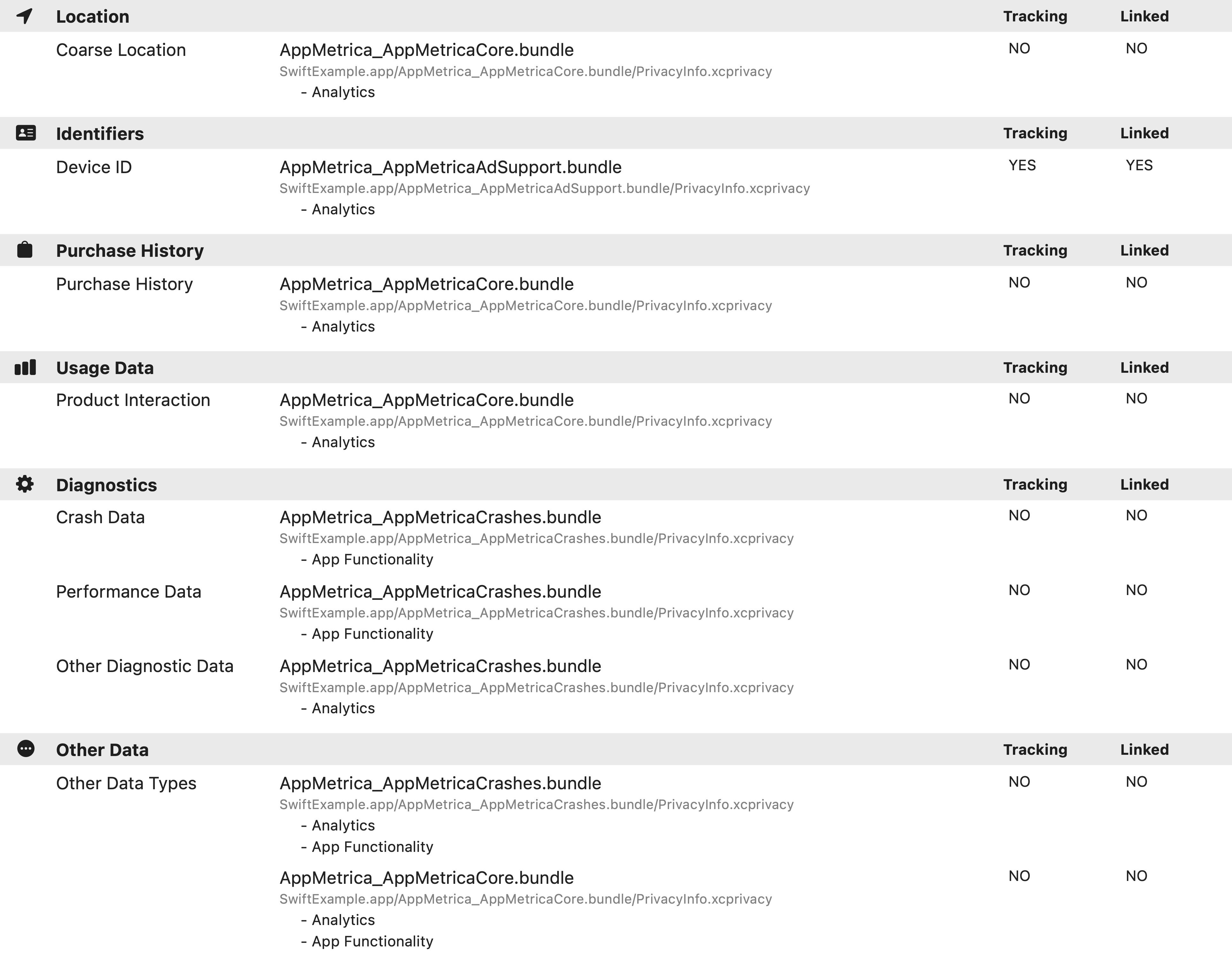 {% endcut %}
{% endnote %}
## Private APIs {#private-api}
According to the Apple policy, some [system API methods](https://developer.apple.com/documentation/bundleresources/privacy_manifest_files/describing_use_of_required_reason_api) may only be used in strictly defined scenarios. Their usage and the reasoning behind it must be specified in the privacy manifest file.
The AppMetrica SDK uses the following keys:
#|
|| **NSPrivacyAccessedAPIType** | **NSPrivacyAccessedAPITypeReasons** | **Comment** ||
|| `NSPrivacyAccessedAPICategoryUserDefaults` | CA92.1 | Reading and storing the data required for the SDK to function. ||
|| `NSPrivacyAccessedAPICategoryFileTimestamp` | C617.1 | Reading the data required for the SDK to function. ||
|#
{% note info %}
If you use other APIs, declare them manually.
{% endnote %}
{% endcut %}
{% cut "App privacy in Google Play" %}
According to [Google's policies](https://support.google.com/googleplay/android-developer/answer/10787469), mobile app developers are required to disclose to Google Play what data their apps collect. This requirement extends to any data collected and processed through third-party libraries or SDKs integrated into the apps. To do so, fill out the **Data safety** form on the [App content](https://play.google.comconsole/app/app-content/summary) page in the Play Console.
This AppMetrica SDK guide helps developers correctly declare how their apps collect, share, and protect user data **when it's processed via the AppMetrica SDK**.
{% note info "" %}
When using the AppMetrica SDK, you're responsible for ensuring your app complies with the applicable privacy policy. If you collect or share any data on your own, you need to make sure you handle, secure, and manage that data properly.
As an app developer, you decide what information to include in the "Data safety" section on Google Play and how to describe how your app collects, shares, and protects user data.
{% endnote %}
## AppMetrica SDK {#sdk}
### Data collection {#data-collection}
Data collection occurs when your app sends data off the user's device.
The AppMetrica SDK used in your app sends user data from their devices. For more details on why this data is collected, see the [Purposes](#purposes) section below.
### Data sharing {#data-sharing}
Data sharing occurs when user data collected by your app is sent to third parties.
User data collected in your app is shared directly with a third party through the integrated AppMetrica SDK. For more details on why this data is shared, see the [Purposes](#purposes) section below.
### Data processing {#data-handling}
For each data type, you can also specify whether its collection is required or optional.
All types of data collected via the AppMetrica SDK (see the [Data types](#data-types) section below) are optional. This means you can initialize the SDK with statistics collection disabled and only enable it after obtaining the user's consent. To learn more, see the "Notice about collecting statistics" section on this page.
### Other data practices {#disclosures}
You can use this section to inform users about the privacy and security measures implemented in your app, such as encryption in transit or ways to request the deletion of collected data.
The AppMetrica SDK encrypts all user data listed on this page in transit using the AES-128 protocol.
The AppMetrica SDK provides developers with the tools needed to delete user data.
## Data types {#data-types}
Here you can learn how the AppMetrica SDK collects and shares various types of user data.
Please note that the data in the table reflects the default AppMetrica SDK configuration. App developers are responsible for adapting these parameters based on their specific settings and use cases.
#|
|| **Data type** | **Description** | **Data collected by the AppMetrica SDK (default configuration)** ||
|| **Location** | > | > ||
|| **Exact location** | The location of a user or device within an area of less than three square kilometers, such as a location obtained via the Android `ACCESS_FINE_LOCATION` permission. | No
{% endcut %}
{% endnote %}
## Private APIs {#private-api}
According to the Apple policy, some [system API methods](https://developer.apple.com/documentation/bundleresources/privacy_manifest_files/describing_use_of_required_reason_api) may only be used in strictly defined scenarios. Their usage and the reasoning behind it must be specified in the privacy manifest file.
The AppMetrica SDK uses the following keys:
#|
|| **NSPrivacyAccessedAPIType** | **NSPrivacyAccessedAPITypeReasons** | **Comment** ||
|| `NSPrivacyAccessedAPICategoryUserDefaults` | CA92.1 | Reading and storing the data required for the SDK to function. ||
|| `NSPrivacyAccessedAPICategoryFileTimestamp` | C617.1 | Reading the data required for the SDK to function. ||
|#
{% note info %}
If you use other APIs, declare them manually.
{% endnote %}
{% endcut %}
{% cut "App privacy in Google Play" %}
According to [Google's policies](https://support.google.com/googleplay/android-developer/answer/10787469), mobile app developers are required to disclose to Google Play what data their apps collect. This requirement extends to any data collected and processed through third-party libraries or SDKs integrated into the apps. To do so, fill out the **Data safety** form on the [App content](https://play.google.comconsole/app/app-content/summary) page in the Play Console.
This AppMetrica SDK guide helps developers correctly declare how their apps collect, share, and protect user data **when it's processed via the AppMetrica SDK**.
{% note info "" %}
When using the AppMetrica SDK, you're responsible for ensuring your app complies with the applicable privacy policy. If you collect or share any data on your own, you need to make sure you handle, secure, and manage that data properly.
As an app developer, you decide what information to include in the "Data safety" section on Google Play and how to describe how your app collects, shares, and protects user data.
{% endnote %}
## AppMetrica SDK {#sdk}
### Data collection {#data-collection}
Data collection occurs when your app sends data off the user's device.
The AppMetrica SDK used in your app sends user data from their devices. For more details on why this data is collected, see the [Purposes](#purposes) section below.
### Data sharing {#data-sharing}
Data sharing occurs when user data collected by your app is sent to third parties.
User data collected in your app is shared directly with a third party through the integrated AppMetrica SDK. For more details on why this data is shared, see the [Purposes](#purposes) section below.
### Data processing {#data-handling}
For each data type, you can also specify whether its collection is required or optional.
All types of data collected via the AppMetrica SDK (see the [Data types](#data-types) section below) are optional. This means you can initialize the SDK with statistics collection disabled and only enable it after obtaining the user's consent. To learn more, see the "Notice about collecting statistics" section on this page.
### Other data practices {#disclosures}
You can use this section to inform users about the privacy and security measures implemented in your app, such as encryption in transit or ways to request the deletion of collected data.
The AppMetrica SDK encrypts all user data listed on this page in transit using the AES-128 protocol.
The AppMetrica SDK provides developers with the tools needed to delete user data.
## Data types {#data-types}
Here you can learn how the AppMetrica SDK collects and shares various types of user data.
Please note that the data in the table reflects the default AppMetrica SDK configuration. App developers are responsible for adapting these parameters based on their specific settings and use cases.
#|
|| **Data type** | **Description** | **Data collected by the AppMetrica SDK (default configuration)** ||
|| **Location** | > | > ||
|| **Exact location** | The location of a user or device within an area of less than three square kilometers, such as a location obtained via the Android `ACCESS_FINE_LOCATION` permission. | No
Collection of this data is disabled by default in all SDK versions starting from 5.0.0.
The app developer can configure the transmission of this data by enabling the `Location tracking` parameter in the SDK settings.
This means that the AppMetrica SDK only collects this data if the developer enables location data collection in their app after obtaining explicit user consent. This SDK **does not collect** and does not attempt to collect this information on its own. ||
|| **Approximate location** | The location of a user or device within an area of at least three square kilometers, such as the user's current city, or a location obtained via the Android `ACCESS_COARSE_LOCATION` permission. | No
Collection of this data is disabled by default in all SDK versions starting from 5.0.0.
The app developer can configure the transmission of this data by enabling the `Location tracking` parameter in the SDK settings.
This means that the AppMetrica SDK only collects this data if the developer enables location data collection in their app after obtaining explicit user consent. This SDK **does not collect** and does not attempt to collect this information on its own. ||
|| **Personal info** | > | > ||
|| **Name** | The user's preferred name, such as their first name, last name, or nickname. | No
The app developer can configure how that data is transmitted if necessary. ||
|| **Email address** | The user's email address. | No
The app developer can configure how that data is transmitted if necessary. ||
|| **User IDs** | The user's identifiers, such as their account number, ID, or name. | No
The app developer can configure how that data is transmitted if necessary. ||
|| **Address** | The user's address, such as their postal or home address. | No
The app developer can configure how that data is transmitted if necessary. ||
|| **Phone number** | The user's phone number. | No
The app developer can configure how that data is transmitted if necessary. ||
|| **Race and ethnicity** | Information about the user's race or ethnicity. | No
The app developer can configure how that data is transmitted if necessary. ||
|| **Political or religious beliefs** | Information about the user's political or religious beliefs. | No
The app developer can configure how that data is transmitted if necessary. ||
|| **Sexual orientation** | Information about the user's sexual orientation. | No
The app developer can configure how that data is transmitted if necessary. ||
|| **Other info** | Any other personal information, such as date of birth, gender identity, or veteran status. | No
The app developer can configure how that data is transmitted if necessary. ||
|| **Financial info** | > | > ||
|| **User payment info** | Information about the user's financial accounts, such as their credit card number. | No
The app developer can configure how that data is transmitted if necessary.
Starting from SDK version 4.0, automatic collection is available for in-app purchase data. You can enable or disable it via the `withRevenueAutoTracking Enabled` method. ||
|| **Purchase history** | Information about the user's purchases and transactions. | No
The app developer can configure how that data is transmitted if necessary.
Starting from SDK version 4.0, automatic collection is available for in-app purchase data. You can enable or disable it via the `withRevenueAutoTracking Enabled` method. ||
|| **Credit score** | Information about the user's credit rating. | No
The app developer can configure how that data is transmitted if necessary.
Starting from SDK version 4.0, automatic collection is available for in-app purchase data. You can enable or disable it via the `withRevenueAutoTracking Enabled` method. ||
|| **Other financial info** | Other financial information, such as the user's salary or debts. | No
The app developer can configure how that data is transmitted if necessary.
Starting from SDK version 4.0, automatic collection is available for in-app purchase data. You can enable or disable it via the `withRevenueAutoTracking Enabled` method. ||
|| **Health and fitness** | > | > ||
|| **Health info** | Information about the user's health, such as medical records or symptoms. | No ||
|| **Fitness info** | Information about the user's physical activity, such as workouts. | No ||
|| **Messages** | > | > ||
|| **Emails** | Content, subject line, and information about the sender and recipients of the user's emails. | No ||
|| **SMS or MMS** | Content and information about the sender and recipients of the user's messages. | No ||
|| **Other in-app messages** | Other types of messages, such as instant messages or chat content. | No ||
|| **Photos or videos** | > | > ||
|| **Photos** | The user's photos. | No ||
|| **Video** | The user's videos. | No ||
|| **Audio files** | > | > ||
|| **Voice or sound recordings** | Audio recordings and recordings of the user's voice, such as voice messages. | No ||
|| **Music files** | The user's music files. | No ||
|| **Other audio files** | Other audio files created or provided by the user. | No ||
|| **Files and docs** | > | > ||
|| **Files and docs** | The user's documents and other files or any information about them, such as file names. | No ||
|| **Calendar** | > | > ||
|| **Calendar events** | Information from the user's calendar, such as events, event notes, and attendees. | No ||
|| **Contacts** | > | > ||
|| **Contacts** | Information about the user's contacts, such as contact names or message history, and information like usernames, call history, contact recency, contact frequency, and interaction duration. | No ||
|| **App activity** | > | > ||
|| **App interactions** | Information about how the user interacts with the app, such as the number of times they visited a page or the sections they tapped. | No
The app developer can configure transmission for this data using custom events. ||
|| **In-app search history** | Information about what the user has searched for in your app. | No
The app developer can configure transmission for this data using custom events. ||
|| **Installed apps** | Information about the apps installed on the user's device. | No
The app developer can configure transmission for this data using custom events. ||
|| **Other user-generated content** | Other user-generated content not mentioned in any section, such as user bios, notes, or open-ended responses. | No
The app developer can configure transmission for this data using custom events. ||
|| **Other actions** | Other in-app user actions not mentioned in any section, such as gameplay, likes, and selected dialog options. | No
The app developer can configure transmission for this data using custom events. ||
|| **Web browsing data** | > | > ||
|| **Web search history** | Information about the websites a user has visited. | No ||
|| **App info and performance** | > | > ||
|| **Crash reports** | Data from your app's crash log, such as the number of crashes and stack traces or other information directly related to crashes. | Yes ||
|| **Diagnostics** | Information about the app's performance, such as battery life, loading time, latency, frame rate, or technical diagnostics. | Yes
The AppMetrica SDK can collect battery level data for crash analytics. ||
|| **Other app performance data** | Other app performance data not mentioned here. | Yes
The AppMetrica SDK can collect additional data. For example, technical information about the device, including the OS version and screen type. ||
|| **Device or other IDs** | > | > ||
|| **Device or other IDs** | Device, browser, or app IDs, such as the IMEI number, MAC address, Widevine device ID, Firebase installation ID, or advertising ID. | Yes, if the developer obtained the user's permission.
Collection of this data can be disabled in SDK version 5.0.0 or higher. ||
|#
## Purposes {#purposes}
Here you can learn the data collection and sharing purposes directly related to data processing by the AppMetrica SDK.
Please note that data collection and sharing purposes may vary depending on how you implement or use the AppMetrica SDK.
#|
|| **Purpose of data use** | **Description** | **Purposes of data collection and sharing via the AppMetrica SDK** ||
|| **App functionality** | Used to ensure the app's features work as intended. | No ||
|| **Analytics** | Used to collect data about app usage or performance. | Yes ||
|| **Developer communications** | Used for sending news or notifications about the app or the developer. | Yes ||
|| **Advertising or marketing** | Used to display ads, set up targeting, send marketing materials, and measure ad performance. | Yes ||
|| **Fraud prevention, security, and compliance** | Used to prevent fraud, ensure security, and comply with legal requirements. | No ||
|| **Personalization** | Used for app customization, such as displaying recommended content or personalized suggestions. | No ||
|| **Account management** | Used for creating or managing user accounts across the developer's services. | No ||
|#
{% endcut %}
{% cut "Masking IP addresses" %}
You might need IP masking in order to meet the requirements for personal data security, including privacy policies on third-party resources and federal laws.
By default, AppMetrica stores the full IP address of users. They are used to determine a user's location more precisely, but aren't shown in any AppMetrica reports.
If you enable IP address masking, AppMetrica disguises the address as soon as it's technically possible at the earliest stages of data collection. When AppMetrica receives the data, the last [octet](https://clck.ru/CyWcY) of an IPv4 address or the last 64 bits of an IPv6 address are replaced with zeros. For example, 192.0.2.2 changes to 192.0.2.0.
## Enabling IP masking {#how-to-enable}
To enable IP address masking:
1. Open the app settings in AppMetrica.
2. Enable **Don't save full IP addresses of EU users**.
{style="border: solid 1px #cccccc; max-width: 800px;"}
{% endcut %}
{% cut "Notice about collecting statistics" %}
You can notify your app users that statistics will be collected, and initialize the SDK with disabled statistics sending before getting consent. This section describes the steps to disable and enable statistics collection:
{% list tabs %}
- Android
To initialize a library with statistics sending option disabled, pass the value `false` into the `withStatisticsSending(boolean value)` method when creating an extended library configuration.
```java translate=no
// Creating an extended library configuration.
AppMetricaConfig config = AppMetricaConfig.newConfigBuilder(API_key)
// Disabling sending statistics.
.withStatisticsSending(false)
.build();
// Initializing the AppMetrica SDK.
AppMetrica.activate(getApplicationContext(), config);
```
After the user has confirmed to send statistics (for example, in the application settings or in the agreement on the first start of the app), you should call the `AppMetrica.setStatisticsSending(Context context, boolean enabled)` method to enable it:
```java translate=no
// Checking the status of the boolean variable. It shows the user confirmation.
if (flag) {
// Enabling sending statistics.
AppMetrica.setStatisticsSending(getApplicationContext(), true);
}
```
- iOS (Objective-C)
To initialize a library with statistics sending option disabled, set the value `NO` for the `statisticsSending` property of the `YMMYandexMetricaConfiguration` configuration.
```objectivec translate=no
// Creating an extended library configuration.
YMMYandexMetricaConfiguration *configuration = [[YMMYandexMetricaConfiguration alloc] initWithApiKey:@"API_key"];
// Disabling sending statistics.
configuration.statisticsSending = NO;
// Initializing the AppMetrica SDK.
[YMMYandexMetrica activateWithConfiguration:configuration];
```
After the user has confirmed to send statistics (for example, in the application settings or in the agreement on the first start of the app), you should call the `+setStatisticsSending:` method of the `YMMYandexMetrica` class to enable it.
```objectivec translate=no
// Checking the status of the boolean variable. It shows the user confirmation.
if (flag) {
// Enabling sending statistics.
[YMMYandexMetrica setStatisticsSending:YES];
}
```
- iOS (Swift)
To initialize a library with statistics sending option disabled, set the value `NO` for the `statisticsSending` property of the `YMMYandexMetricaConfiguration` configuration.
```swift translate=no
// Creating an extended library configuration.
let configuration = YMMYandexMetricaConfiguration.init(apiKey: "API key")
// Disabling sending statistics.
configuration?.statisticsSending = false
// Initializing the AppMetrica SDK.
YMMYandexMetrica.activate(with: configuration!)
```
After the user has confirmed to send statistics (for example, in the application settings or in the agreement on the first start of the app), you should call the `setStatisticsSending(_:)` method of the `YMMYandexMetrica` class to enable it.
```swift translate=no
// Checking the status of the boolean variable. It shows the user confirmation.
if flag {
// Enabling sending statistics.
YMMYandexMetrica.setStatisticsSending(true);
}
```
{% endlist %}
## Alert example {#example-section}
You can use any text to inform users of statistics collection. For example:
> This app uses the AppMetrica analytical service (Yandex Metrica for apps) provided by YANDEX LLC, ulitsa Lva Tolstogo 16, Moscow, Russia 119021 (hereinafter referred to as Yandex) based on the [Terms of Use](https://yandex.ru/legal/metrica_termsofuse/).
>
> AppMetrica analyzes app usage data, including the device it is running on, the installation source, calculates conversion, collects statistics of your activity for product analytics, ad campaign analysis, and optimization, as well as for troubleshooting. Information collected in this way cannot identify you.
>
> Depersonalized information about your use of this app collected by AppMetrica tools will be transferred to Yandex and stored on a Yandex server in the EU and the Russian Federation. Yandex will process this information to assess how you use the app, compile reports for us on our app operation, and provide other services.
{% endcut %}
{% cut "Deleting data" %}
You can delete all the data collected through AppMetrica that belongs to your username.
Data is divided into several categories:
- App records. In this case, any data collected by Yandex about these apps will be deleted.
- Folders.
- Partners.
You can delete data all together or separately for each category.
To delete data:
1. Open the [Your data on Yandex](https://passport.yandex.ru/profile/data) page and log in with the Yandex ID that you use to work with AppMetrica. To log in, enter the code from an SMS sent to the phone number linked to this Yandex ID.
2. Under **Delete data**, select AppMetrica.
3. In the window that opens, click **Delete** next to the selected data category. If you decide not to delete the data, click **Cancel**.
Once deleted, no one can access your data and Yandex stops using it.
You can restore the data collected through AppMetrica within 14 days after deletion. To do this, contact support. After 14 days, the data cannot be restored.
{% endcut %}
If you didn't find the answer you were looking for, you can use the feedback form to submit your question. Please describe the problem in as much detail as possible. Attach a screenshot if possible.
Contact support
Suggest an improvement for documentation
[*location]: \* Geolocation data is used if the `locationTracking` option is explicitly enabled and the user's permission is obtained. [Request for permission](https://developer.apple.com/documentation/corelocation/cllocationmanager?language=objc) must be implemented on your app's end.
[*id-user]: \* The user ID (`NSPrivacyCollectedDataTypeUserID`) is used if you set up the `ProfileID` sending.
[*id-device]: \* Device IDs (`NSPrivacyCollectedDataTypeDeviceID`) are used by default if the user's permission is obtained. [Request for permission](https://developer.apple.com/documentation/apptrackingtransparency/) must be implemented on your app's end.
[*purchase]: \* The purchase history (`NSPrivacyCollectedDataTypePurchaseHistory`) is used by default starting with the SDK version 4.0.0. You can disable transmission of that data using the `revenueAutoTrackingEnabled` property.
[*other-data]: \* Other data (`NSPrivacyCollectedDataTypeOtherDataTypes`) means general information about the device, such as the OS version, screen resolution, and so on.