---
metadata:
- name: generator
content: Diplodoc Platform v5.50.6
alternate:
- https://appmetrica.yandex.com/docs/en/mobile-tracking/tracking-specification.md
- https://appmetrica.yandex.com/docs/ru/mobile-tracking/tracking-specification.md
---
> **Documentation Index:** Fetch the complete configuration index at https://appmetrica.yandex.com/docs/en/llms.txt
# Parameters of the tracking URL
This section describes the structure and parameters of the AppMetrica tracking URL.
## Structure {#structure}
```no-highlight translate=no
https://redirect|impression.appmetrica.yandex.com/serve/[tracking ID — The ID of the tracker]
```
Use the `redirect.appmetrica.yandex.com` domain for click attribution and the `impression.appmetrica.yandex.com` domain for impression attribution.
Example:
```no-highlight translate=no
https://redirect.appmetrica.yandex.com/serve/1019409635088005254
```
`redirect.appmetrica.yandex.com` — The main domain currently in use. Possible variations:
- `appmetrika.yandex.com`
- `appmetrica.yandex.ru`
- `appmetrika.yandex.ru`
The tracking URL can contain predefined parameters that are required for tracking to work. The advertising system (the AppMetrica partner) must transmit specific values via these parameters. To simplify this process, AppMetrica provides macros of various media sources for substituting in parameters. For example:
AppMetrica stores `macros-params` corresponding to **Partner A**:
- `click_id — {transaction_id}`
- `google_aid — {GAID}`
The resulting tracking URL for **Partner A**:
```
https://redirect.appmetrica.yandex.com/serve/1019409635088005254?click_id={transaction_id}&google_aid={GAID}
```
The user must provide this tracking URL to Partner A. Tracking will begin automatically.
## Parameters {#params}
Parameters are divided into categories: required, recommended, and optional. Note that there are additional parameters for S2S calls.
### Required {#required-params}
`click_id={YOURMACRO}&` — Macro for transmitting a unique `click ID`. Used for deduplication.
### Recommended {#recommended-params}
Parameters for more exact counts of installations.
`google_aid={YOURMACRO}&` — Google AID in the format it was received from the device in.
`google_aid_sha1={YOURMACRO}&` — SHA1 hash of Google AID.
`google_aid_md5={YOURMACRO}&` — MD5 hash of Google AID.
`ios_ifa={YOURMACRO}&` — IFA in the format it was received from the device in.
`ios_ifa_sha1={YOURMACRO}&` — SHA1 hash of IFA.
`ios_ifa_md5={YOURMACRO}&` — MD5 hash of IFA.
`oaid = {YOURMACRO}&` — Huawei OAID in the format it was received from the device in.
`oaid_sha1={YOURMACRO}&` — SHA1 hash of Huawei OAID.
`oaid_md5={YOURMACRO}&` — MD5 hash of Huawei OAID.
`windows_aid = {YOURMACRO}&` — Windows AID in the format it was received from the device in.
`windows_aid_sha1={YOURMACRO}&` — SHA1 hash of Windows AID.
`windows_aid_md5={YOURMACRO}&` — MD5 hash of Windows AID.
### Parameters for S2S calls {#s2s-params}
`device_ip={YOURMACRO}&` — The device's URL-encoded IP address. IPv4 and IPv6 are supported.
`device_ua={YOURMACRO}&` — The device's URL-encoded User-Agent.
`click_timestamp={YOURMACRO}&` — UTC timestamp of the click in seconds.
`noredirect={YOURMACRO}&` — Notifies AppMetrica that the click should be counted without redirection to the app store. The default value is 1.
For more information about s2s integration, see [S2S integration](https://appmetrica.yandex.com/docs/en/mobile-tracking/s2s.md).
### Optional {#optional-params}
Parameters for campaign optimization. The transmitted parameters are displayed in the [Traffic sources](https://appmetrica.yandex.com/statistic?appId=1111&report=campaigns2&metrics=ym_m_advInstallDevicesFake&sampling=medium) report in a tree view.
`afpub_id={YOURMACRO}&` — ID of an affiliated publisher (sub-partner).
`site_id={YOURMACRO}&` — ID of a specific advertising place.
`creative_id={YOURMACRO}&` — ID of a specific banner.
`appmetrica_js_redirect=0&` — Disables JavaScript redirects.
### Custom parameters {#custom-params}
For better campaign optimization, the advertiser and advertising network can transmit additional parameters in the tracking URL.
To send custom parameters, add them to the tracking URL. There are multiple ways to transmit values using these parameters:
- Manually — Enter the parameter value:
```
custom_parameter=value&
```
- Automatically — Use macros for automatic substitution on the advertising network's side:
```
example_param={CUSTOM_MACRO}&
```
All parameters listed in the tracking URL are shown in the [Traffic sources](https://appmetrica.yandex.com/statistic?appId=1111&report=campaigns2&metrics=ym_m_advInstallDevicesFake&sampling=medium) report in a tree view.
## Examples {#examples}
You can use these examples for testing — replace the macros with your own. Delete any unnecessary, unsupported, or optional parameters as needed.
**Android**
```
https://redirect.appmetrica.yandex.com/serve/600573419754384676?click_id={transaction_id}&google_aid={google_aid}&afpub_id={affiliate_id}&custom_price={payout}
```
**iOS**
```
https://redirect.appmetrica.yandex.com/serve/528515824760210044?click_id={transaction_id}&ios_ifa={ios_ifa}&afpub_id={affiliate_id}&custom_price={payout}
```
## Sending parameters to the postback URL, deeplink, and destination URL {#passing-params}
To pass a parameter value from the tracking URL to the postback URL, deeplink, or destination URL, add the parameter name to their URLs in curly brackets: `{custom_parameter}`. Any parameters can be transmitted this way — custom or pre-defined.
{% note info "" %}
If you use the [Universal link](https://appmetrica.yandex.com/docs/en/sdk/ios/analytics/ios-universal-links.md) as a tracking URL, the parameters are automatically passed to deeplink.
{% endnote %}
Examples of transmitting parameters:
{% cut "To the destination URL" %}
To add a macro to transmit, edit the destination URL in the tracker settings:
For example, suppose the tracking URL includes the following parameters:
```
https://redirect.appmetrica.yandex.com/serve/123456?custom_parameter=value1&another_param=value2
```
To pass `value1` and `value2` in the destination URL, edit it as follows:
```
https://endpoint.myadnetwork.com?some_parameter={custom_parameter}&another_param={another_param}
```
{% endcut %}
{% cut "To the postback URL" %}
To add a macro to transmit, edit the postback URL in the tracker settings:
For example, suppose the tracking URL includes the following parameters:
```
https://redirect.appmetrica.yandex.com/serve/123456?custom_parameter=value1&another_param=value2
```
To pass `value1` and `value2` in the postback URL, edit it as follows:
```
https://endpoint.myadnetwork.com?some_parameter={custom_parameter}&another_param={another_param}
```
{% endcut %}
{% cut "To a deeplink" %}
Parameters from the tracking URL are passed to the deeplink in the following way:
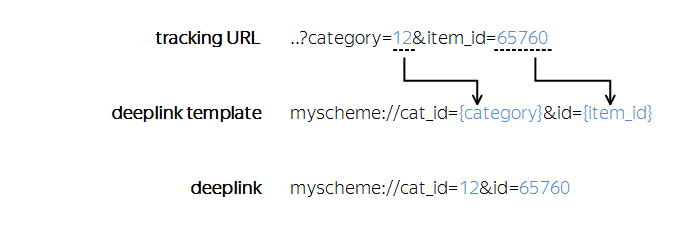
To add a macro to transmit, edit the deeplink in the tracker settings:
For example, suppose the tracking URL includes the following parameters:
```
https://redirect.appmetrica.yandex.com/serve/123456?custom_parameter=value1&another_param=value2
```
To pass `value1` and `value2` in the deeplink, edit it as follows:
```
myscheme://custom_parameter={custom_parameter}&another_param={another_param}
```
{% endcut %}
## Learn more {#learn-more}
- [AppMetrica Blog: Parameters of the tracking URL](https://appmetrica.yandex.ru/blog/custom-url-parameters)
- [Does AppMetrica use UTM tags?](https://appmetrica.yandex.com/docs/en/troubleshooting/troubleshooting.md#utm)
If you didn't find the answer you were looking for, you can use the feedback form to submit your question. Please describe the problem in as much detail as possible. Attach a screenshot if possible.
Contact support
Suggest an improvement for documentation