---
metadata:
- name: generator
content: Diplodoc Platform v5.50.6
alternate:
- https://appmetrica.yandex.com/docs/en/data-collection/upload-dsym.md
- https://appmetrica.yandex.com/docs/ru/data-collection/upload-dsym.md
---
> **Documentation Index:** Fetch the complete configuration index at https://appmetrica.yandex.com/docs/en/llms.txt
# Uploading dSYM files on iOS
Information about crashes on iOS is sent in [unsymbolicated](https://developer.apple.com/library/archive/technotes/tn2151/_index.html) crash logs. It's difficult to extract data for analysis from these crash logs. To analyze the crash logs, upload dSYM files to AppMetrica.
The AppMetrica SDK has a built-in command-line tool named [helper](#helper) for uploading dSYM files. To build an app based on [fastlane](https://docs.fastlane.tools), use the [upload plugin](https://github.com/yandexmobile/metrica-plugin-fastlane). It helps you set up automatic dSYM file uploads when building your app.
## Automatic uploading when building an app {#auto}
Use [fastlane](https://docs.fastlane.tools) to build your app:
1. Install the `appmetrica` fastlane plugin:
```bash translate=no
fastlane add_plugin appmetrica
```
For more information about how to add the plugin, see [fastlane docs](https://docs.fastlane.tools/plugins/using-plugins/#add-a-plugin-to-your-project).
2. Add the following to the `fastlane/Fastfile` file:
```bash translate=no
lane :release do
# Your actions before.
gym(
workspace: "MyApp.xcworkspace",
configuration: "Release",
scheme: "MyApp",
export_method: "app-store" # Pass the correct export_method.
)
upload_symbols_to_appmetrica(post_api_key: "Post API key")
# Your actions after.
end
```
You can get the Post API key in the AppMetrica **Settings**. It's used to identify your app.
{% note alert "" %}
Apps are built using the [gym](https://docs.fastlane.tools/actions/gym/#gym) action with export enabled. If you build your app using Xcode, the app is recompiled after you upload it to App Store Connect. In this case, you won't be able to use the dSYM files generated during the build.
{% endnote %}
3. Add a stage for uploading dSYM files via the `helper`. The `helper` tool has been supported since version 3.8.0 of the AppMetrica SDK. It's in the SDK archive. [Helper tool reference](#helper).
1. Open the project in Xcode.
2. In the project navigator, select the project file.
3. In the **Targets** block, select your app.
4. Open the **Build Phases** tab.
5. Click **+** → **New Run Script Phase**.
6. Add the following to the **Type a script** field:
```bash translate=no
if [ -d "${PODS_ROOT}/AppMetricaCrashes" ]; then
HELPER_PATH=`find "${PODS_ROOT}/AppMetricaCrashes" -name "helper"`
if [ -x "${HELPER_PATH}" ]; then
"${HELPER_PATH}" auto --post-api-key="Post API key"&
else
echo "Crash helper was not found"
fi
fi
```
{% note info "" %}
`auto` mode uses the `CONFIGURATION` environment variable. If the build is done with the `Debug` configuration, no dSYM files are uploaded.
{% endnote %}
## Uploading a missing dSYM file {#after-upload}
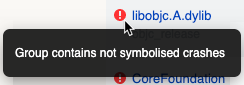
If a dSYM file wasn't uploaded when building an app, crash reports contain a warning about unsymbolicated crashes.
{style="border: solid 1px #cccccc; max-width: 800px;"}
To symbolicate them, upload the missing dSYM files. You can view the list of missing files on the **Settings** → **Crashes** page of your app in AppMetrica.
You can upload missing dSYM files:
{% list tabs %}
- Using fastlane
1. Install the `appmetrica` fastlane plugin:
```bash translate=no
fastlane add_plugin appmetrica
```
For more information about how to add the plugin, see [fastlane docs](https://docs.fastlane.tools/plugins/using-plugins/#add-a-plugin-to-your-project).
2. Add the following to the `fastlane/Fastfile` file:
```bash translate=no
lane :refresh_dsyms do
download_dsyms
upload_symbols_to_appmetrica(post_api_key: "Post API key")
clean_build_artifacts
end
```
In the `download_dsyms` action, you can specify the required app version and build number:
```bash translate=no
...
download_dsyms(version: "1.0.0", build_number: "345")
...
```
Learn more about the `download_dsyms` action in the [fastlane](https://docs.fastlane.tools/actions/download_dsyms/) documentation.
- Via the web interface
1. Find the necessary archive with the dSYM file:
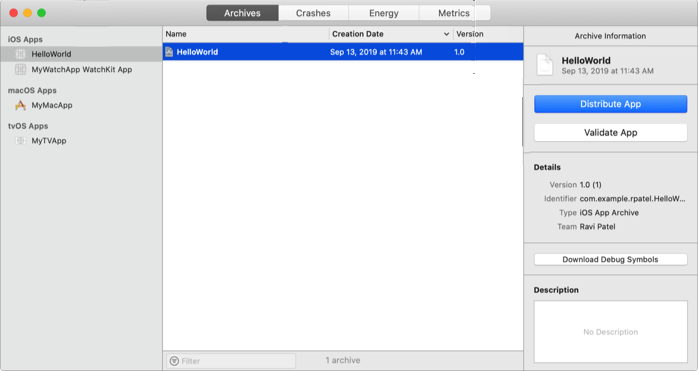
{% cut "Via Xcode Organizer" %}
1. In the Xcode interface, click **Window** → **Organizer**.
2. In the **Archives** tab, select the appropriate app version.
3. Click **Download dSYM**.
 {% endcut %}
{% cut "Via App Store Connect" %}
1. In the iTunes Connect interface, open the **Activity** page.
2. In the **All Builds** tab, select the appropriate build number.
3. Click **Download dSYM**.
{% endcut %}
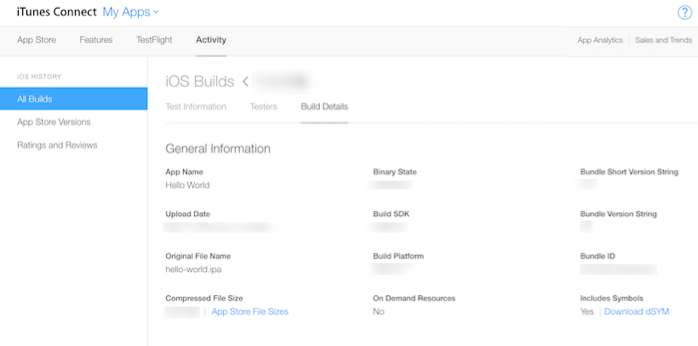
{% cut "Via App Store Connect" %}
1. In the iTunes Connect interface, open the **Activity** page.
2. In the **All Builds** tab, select the appropriate build number.
3. Click **Download dSYM**.
 {% endcut %}
You can use the dSYM file that was generated during the build.
2. In the AppMetrica interface, go to the app settings from the menu on the left.
3. Open **Crashes** → **iOS**.
4. Click **Choose file** and upload the ZIP archive containing the `app.dSYM` or `app` directory.
- Using the helper tool
{% note alert "" %}
This option is only suitable for apps that are built without Bitcode.
{% endnote %}
To use the plugin, install the AppMetrica SDK with version 3.8.0 or higher.
To upload missing dSYM files to AppMetrica, run the following command in the terminal:
```bash translate=no
helper -k
```
`file_path` — A list of dSYM files or the folders where they're stored.
[Helper tool reference](#helper).
{% endlist %}
## Helper tool reference {#helper}
{% note info "" %}
The `helper` tool has been supported since version 3.8.0 of the AppMetrica SDK. It's in the SDK archive.
{% endnote %}
Helper is a command-line tool that lets you upload dSYM files to AppMetrica.
```bash translate=no
$ helper [auto] [-o | --package-output-path=] [-v | --verbose]
[--version] -k | --post-api-key= [file ...]
```
**Parameters**
#|
|| `auto` | Auto upload mode. In this mode, the `helper` uses the following variables:
- `CONFIGURATION` — Used to define the configuration. If the build is done with the `Debug` configuration, no dSYM files are uploaded.
- `DWARF_DSYM_FOLDER_PATH` — Used to find dSYM files. It usually depends on the `BUILT_PRODUCTS_DIR` variable.
- `AMA_POST_API_KEY` — [Post API key](*Post API key). If specified, you can use the short `helper auto&` command in the auto mode. ||
|| `‑k` | Post API key. You can get the Post API key in the **Settings** of AppMetrica. It's used to identify your app. ||
|| `‑o` | The path to the folder where temporary files are stored.
By default, the system folder is used. ||
|| `‑v` | Enables the display of additional information. ||
|| `‑‑version` | Outputs the version. ||
|| `file` | The list of dSYM files or folders where they're stored.
By default, the local working folder is used.||
|#
`&` lets you run the `helper` concurrently, without blocking the build of the entire project. Sample command:
```
helper auto --post-api-key="Post API key"&
```
## Learn more {#learn-more}
- [Crashes and errors report](https://appmetrica.yandex.com/docs/en/mobile-reports/crashes-and-errors.md)
- [Apple documentation](https://developer.apple.com/library/archive/technotes/tn2151/_index.html)
If you didn't find the answer you were looking for, you can use the feedback form to submit your question. Please describe the problem in as much detail as possible. Attach a screenshot if possible.
Contact support
Suggest an improvement for documentation
[*Post API key]: You can get the Post API key in the AppMetrica **Settings**. It's used to identify your app.
{% endcut %}
You can use the dSYM file that was generated during the build.
2. In the AppMetrica interface, go to the app settings from the menu on the left.
3. Open **Crashes** → **iOS**.
4. Click **Choose file** and upload the ZIP archive containing the `app.dSYM` or `app` directory.
- Using the helper tool
{% note alert "" %}
This option is only suitable for apps that are built without Bitcode.
{% endnote %}
To use the plugin, install the AppMetrica SDK with version 3.8.0 or higher.
To upload missing dSYM files to AppMetrica, run the following command in the terminal:
```bash translate=no
helper -k
```
`file_path` — A list of dSYM files or the folders where they're stored.
[Helper tool reference](#helper).
{% endlist %}
## Helper tool reference {#helper}
{% note info "" %}
The `helper` tool has been supported since version 3.8.0 of the AppMetrica SDK. It's in the SDK archive.
{% endnote %}
Helper is a command-line tool that lets you upload dSYM files to AppMetrica.
```bash translate=no
$ helper [auto] [-o | --package-output-path=] [-v | --verbose]
[--version] -k | --post-api-key= [file ...]
```
**Parameters**
#|
|| `auto` | Auto upload mode. In this mode, the `helper` uses the following variables:
- `CONFIGURATION` — Used to define the configuration. If the build is done with the `Debug` configuration, no dSYM files are uploaded.
- `DWARF_DSYM_FOLDER_PATH` — Used to find dSYM files. It usually depends on the `BUILT_PRODUCTS_DIR` variable.
- `AMA_POST_API_KEY` — [Post API key](*Post API key). If specified, you can use the short `helper auto&` command in the auto mode. ||
|| `‑k` | Post API key. You can get the Post API key in the **Settings** of AppMetrica. It's used to identify your app. ||
|| `‑o` | The path to the folder where temporary files are stored.
By default, the system folder is used. ||
|| `‑v` | Enables the display of additional information. ||
|| `‑‑version` | Outputs the version. ||
|| `file` | The list of dSYM files or folders where they're stored.
By default, the local working folder is used.||
|#
`&` lets you run the `helper` concurrently, without blocking the build of the entire project. Sample command:
```
helper auto --post-api-key="Post API key"&
```
## Learn more {#learn-more}
- [Crashes and errors report](https://appmetrica.yandex.com/docs/en/mobile-reports/crashes-and-errors.md)
- [Apple documentation](https://developer.apple.com/library/archive/technotes/tn2151/_index.html)
If you didn't find the answer you were looking for, you can use the feedback form to submit your question. Please describe the problem in as much detail as possible. Attach a screenshot if possible.
Contact support
Suggest an improvement for documentation
[*Post API key]: You can get the Post API key in the AppMetrica **Settings**. It's used to identify your app.