---
metadata:
- name: generator
content: Diplodoc Platform v5.50.6
alternate:
- https://appmetrica.yandex.com/docs/en/data-collection/crash-mails.md
- https://appmetrica.yandex.com/docs/ru/data-collection/crash-mails.md
---
> **Documentation Index:** Fetch the complete configuration index at https://appmetrica.yandex.com/docs/en/llms.txt
# Email notifications
Set up email notifications to receive information about crashes and errors. AppMetrica will notify developers about the following issues:
- A new group of crashes or errors appeared.
- Problematic sessions exceeded a specified percentage.
Enable notifications:
1. In the AppMetrica interface, go to the **Settings** → **Main**.
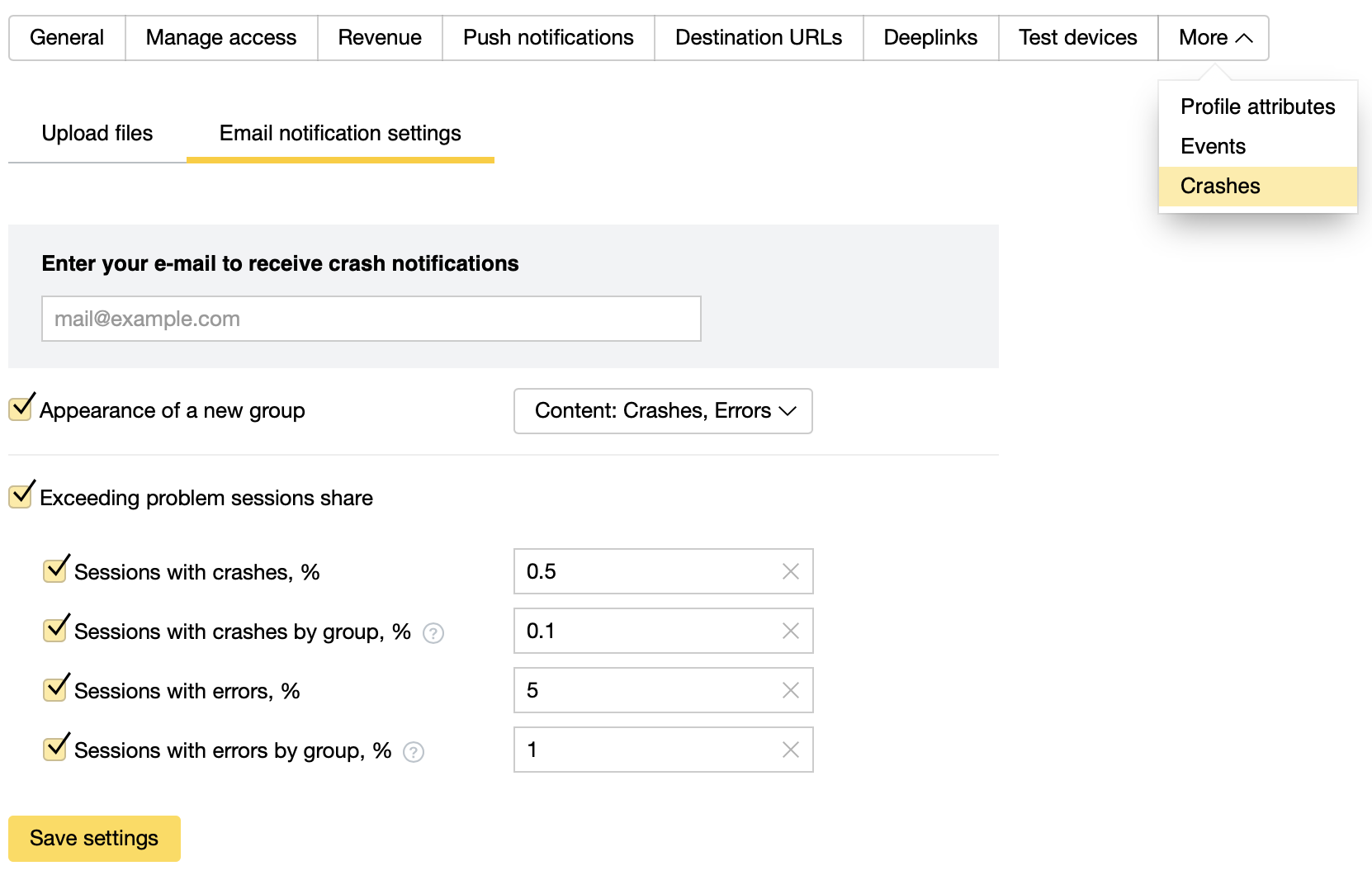
2. On the **More** tab, select **Crashes** and go to the **Email notification settings** tab.
{style="border: solid 1px #cccccc; max-width: 800px;"}
3. Enter an email address.
4. Select the relevant options.
{% cut "Options" %}
- **When a new group appears**
You will receive messages about new or reopened groups that you previously closed in the [Crashes/Errors report](https://appmetrica.yandex.com/docs/en/mobile-reports/crashes-and-errors.md). In the drop-down list, select the content: crashes and/or errors.
For more information about groups, see [Setting up data collection](https://appmetrica.yandex.com/docs/en/data-collection/about-crashes-and-errors.md).
- **If the share of problem sessions exceeds**
- **Sessions with crashes, %**
Specify the percentage per app.
- **Sessions with crashes from the same group, %**
Specify the percentage per crash group
- **Sessions with errors, %**
Specify the percentage per app.
- **Sessions with errors in the same group, %**
Specify the percentage per error group
When the number of sessions with crashes or errors exceeds the limit, you get a message.
{% endcut %}
5. Click **Save settings** and check your email. In the email, click on the link to confirm your address.
The system checks your app for problem sessions every 10 minutes.
If lots of emails come to your mailbox and you want to decrease their amount, you can:
- Change the limits that trigger notification.
- Disable this feature.
## Learn more {#learn-more}
- [Crashes and errors report](https://appmetrica.yandex.com/docs/en/mobile-reports/crashes-and-errors.md)
- [Setting up data collection](https://appmetrica.yandex.com/docs/en/data-collection/about-crashes-and-errors.md)
If you didn't find the answer you were looking for, you can use the feedback form to submit your question. Please describe the problem in as much detail as possible. Attach a screenshot if possible.
Contact support
Suggest an improvement for documentation