---
metadata:
- name: generator
content: Diplodoc Platform v5.50.6
alternate:
- https://appmetrica.yandex.com/docs/en/data-collection/about-events.md
- https://appmetrica.yandex.com/docs/ru/data-collection/about-events.md
---
> **Documentation Index:** Fetch the complete configuration index at https://appmetrica.yandex.com/docs/en/llms.txt
# Events
Events help you track any user actions within your app.
#### Why set up event sending? {#important}
AppMetrica doesn't directly track user actions within your app. However, it can collect information about these actions through events, such as:
- The user views a specific screen.
- The user clicks a specific button.
These events are sent to AppMetrica and displayed in the [Events](https://appmetrica.yandex.com/docs/en/mobile-reports/events-report.md) report. [Examples of sending events](#report-events).
## Event nesting levels {#level}
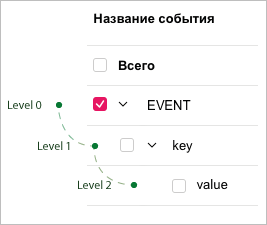
To send an event with nested parameters, pass a `key:value` pair. In the interface, `key` and `value` are considered nesting levels.
{style="border: solid 1px #cccccc; max-width: 800px;"}
{% note info "" %}
AppMetrica supports sending events with multi-level nested parameters.
{% endnote %}
When passing parameters in JSON format, each new object in the value indicates a new nesting level, such as:
```
"{
"param1":"1", // nesting level 1
"param2":"abc",
"param3": {
"paramLevel2": "2", // nesting level 2
"param2Level2": {
"paramLevel3": "3", // nesting level 3
"param2Level3":{
"level": "4" // nesting level 4
}
}
}
}"
```
The AppMetrica web interface displays up to five nesting levels for events. So if an event has six or more levels, only the top five are shown in the report.
{% note info "" %}
You can use the [Reporting API](https://appmetrica.yandex.com/docs/en/mobile-api/stat/intro.md) to get up to ten event nesting levels.
{% endnote %}
## Interpretation of numeric and string values {#value}
In the AppMetrica interface, the values `{"count": 3}` and `{"count": "3"}` are interpreted the same way. However, when exporting data using the Reporting API or [Logs API](https://appmetrica.yandex.com/docs/en/mobile-api/logs/about.md), parameters are exported in the same form as they were sent to the server.
If the same event is passed multiple times with different numeric parameter values, the parameter values are not aggregated in the web interface. Each of them is recorded and calculated separately.
{% note info "" %}
You can use the Reporting API to export additional fields: the total and average of all numeric values.
{% endnote %}
## Partially matched nested events {#similar}
You can pass varying parameter values with the same event.
If the server receives events with repeated parameters, their values are accumulated, and the report displays the count of each unique value.
If the server receives events with duplicate parameters but different nesting levels, their values are added together based on duplicate parameters.
For example, the first event has two nesting levels:
```java translate=no
{
"param1": "param2"
}
```
The second one has three nesting levels:
```java translate=no
{
"param1": {
"param2": "value"
}
}
```
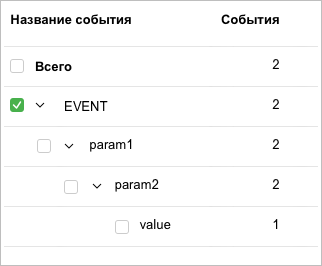
In the web interface, these events are displayed as a tree view:
{style="border: solid 1px #cccccc; max-width: 800px;"}
Events are counted using the following algorithm:
1. The event is recorded, along with two of its sublevels. 1 is added to each parameter.
1. 1 is added to the event name and three of its sublevels.
## Funnels {#funnels}
To analyze the chain of events and to compare conversion rates, use the [Funnels](https://appmetrica.yandex.com/docs/en/mobile-reports/funnels-report.md) report. Configure 1 to 10 steps by including one or more events from the app in each step. For multi-level events, use key and value filtering.
Use funnels to compare target event conversions on different versions of the app, assess trends in behavioral scenario conversions, or find out how much of the audience needed a particular app function (number of users and percentage).
This way you will find growth points and implement the best ideas for your user. For more information, see [Funnels](https://appmetrica.yandex.com/docs/en/mobile-reports/funnels-report.md).
## Sending an event {#report-events}
Examples of sending an event on various platforms:
- [Android](https://appmetrica.yandex.com/docs/en/sdk/android/analytics/android-operations.md#report-event)
- [iOS](https://appmetrica.yandex.com/docs/en/sdk/ios/analytics/ios-operations.md#report-event)
- [Flutter](https://appmetrica.yandex.com/docs/en/sdk/flutter/analytics/flutter-operations.md#report-event)
- [React Native](https://appmetrica.yandex.com/docs/en/sdk/react-native/analytics/react-native-operations.md#report-event)
- [Unity](https://appmetrica.yandex.com/docs/en/sdk/unity/analytics/unity-operations.md#report-event)
## Learn more {#learm-more}
- [Events report](https://appmetrica.yandex.com/docs/en/mobile-reports/events-report.md)
- [Funnel report](https://appmetrica.yandex.com/docs/en/mobile-reports/funnels-report.md)
- [Reporting API](https://appmetrica.yandex.com/docs/en/mobile-api/stat/intro.md)
- [Logs API](https://appmetrica.yandex.com/docs/en/mobile-api/logs/about.md)
- [Limiting custom events](https://appmetrica.yandex.com/docs/en/common/limits.md)
If you didn't find the answer you were looking for, you can use the feedback form to submit your question. Please describe the problem in as much detail as possible. Attach a screenshot if possible.
Contact support
Suggest an improvement for documentation